
What is an agentic IDE?
An agentic IDE is a development environment where you give a coding agent a goal, and the agent plans the work, edits files across the project, runs commands and checks the result. The IDE shows you each step and lets you review the changes, approve what the agent asks for and correct it while it works. You still decide what goes into the code. You type much less of it.
What an agentic IDE does with one request
Take one request: "the export button downloads an empty file in Safari; fix it and add a test".
- You state the goal in plain words. You do not name the files.
- The agent reads the project. It searches the code, opens the files that matter and makes a plan.
- It edits the files. One change can touch many files.
- It runs commands: the tests, the build, a linter, git.
- It reads what the commands printed and fixes what failed.
- It reports what it changed, and you review the diff.
Steps 2 to 5 repeat without you. That loop is what "agentic" means. An editor that suggests the next line has no such loop: you run the tests and you read the error.
Agentic IDE vs IDE, AI code editor and terminal agent
| Classic IDE | AI autocomplete editor | Terminal coding agent | Agentic IDE | |
|---|---|---|---|---|
| Who writes the code | You | You, with suggested lines and blocks | The agent | The agent |
| What you give it | Keystrokes | Keystrokes and short prompts | A goal in plain words | A goal in plain words |
| Who runs the tests and the build | You | You | The agent | The agent |
| What you look at | The editor | The editor | Text scrolling in a terminal | A transcript of steps, with diffs, files and a shell beside it |
| How you review | You wrote it | Accept or reject each suggestion | Read the terminal, then open the diff in another tool | A diff view in the same window, with the checks the agent ran |
| Several tasks at once | One window per project | One window per project | One terminal per agent | Sessions side by side, each marked when it finishes or waits for you |
Claude Code in a terminal and Codex CLI are terminal coding agents. Anthropic describes Claude Code as an agentic coding tool that reads your codebase, edits files and runs commands; it also comes as IDE extensions, a desktop app and a web app. OpenAI's Codex CLI inspects code, makes changes and runs commands from your terminal. Cursor is an editor with an agent built in: its agent completes coding tasks, runs terminal commands and edits code.
So an agentic IDE comes in two shapes. Some bring their own agent, as Cursor does. Others go around the terminal agents you already use, as Fezu does.
The parts of an agentic IDE
The agent does the typing, so the IDE's work is to let you see, judge and steer. These are the parts that do it, with how Fezu builds each one.
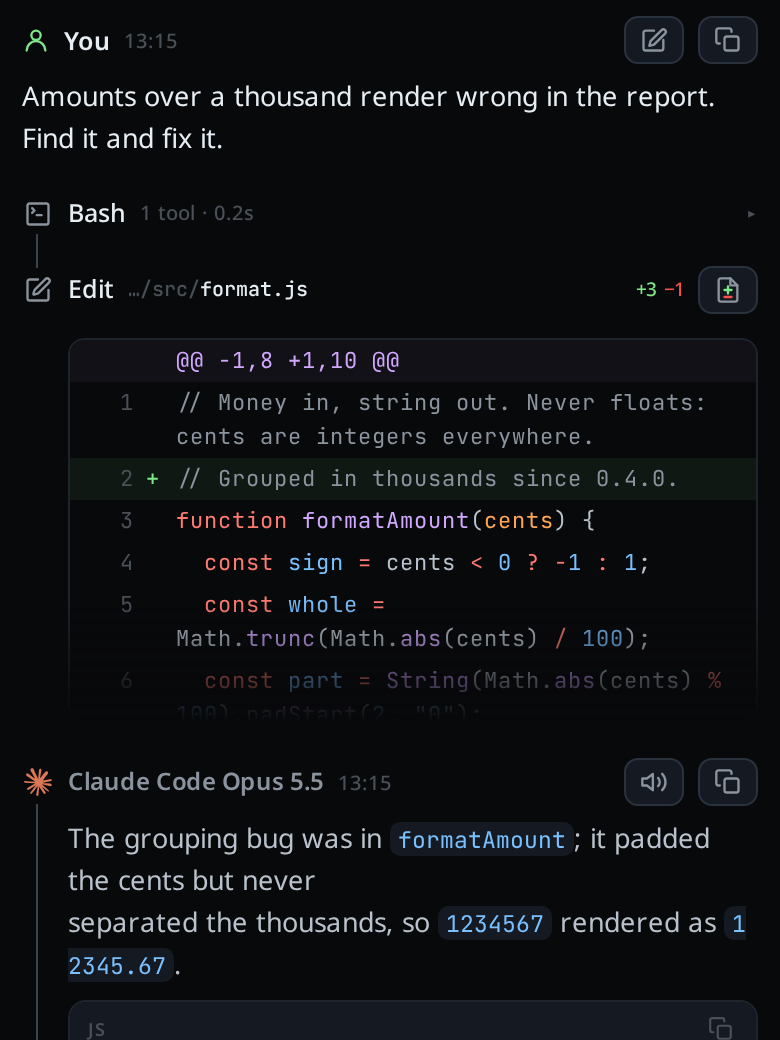
A transcript of every step
You cannot review work you cannot see. An agentic IDE keeps a record of each command the agent ran, what the command printed, and each edit.
In Fezu the transcript shows your message, then a card for each step. A BASH card holds a command and its output. An EDIT card holds the first lines of a patch. In the Transcript group in settings you choose how much of each step shows: thinking, tool calls and edits each have their own level.
A diff you can review
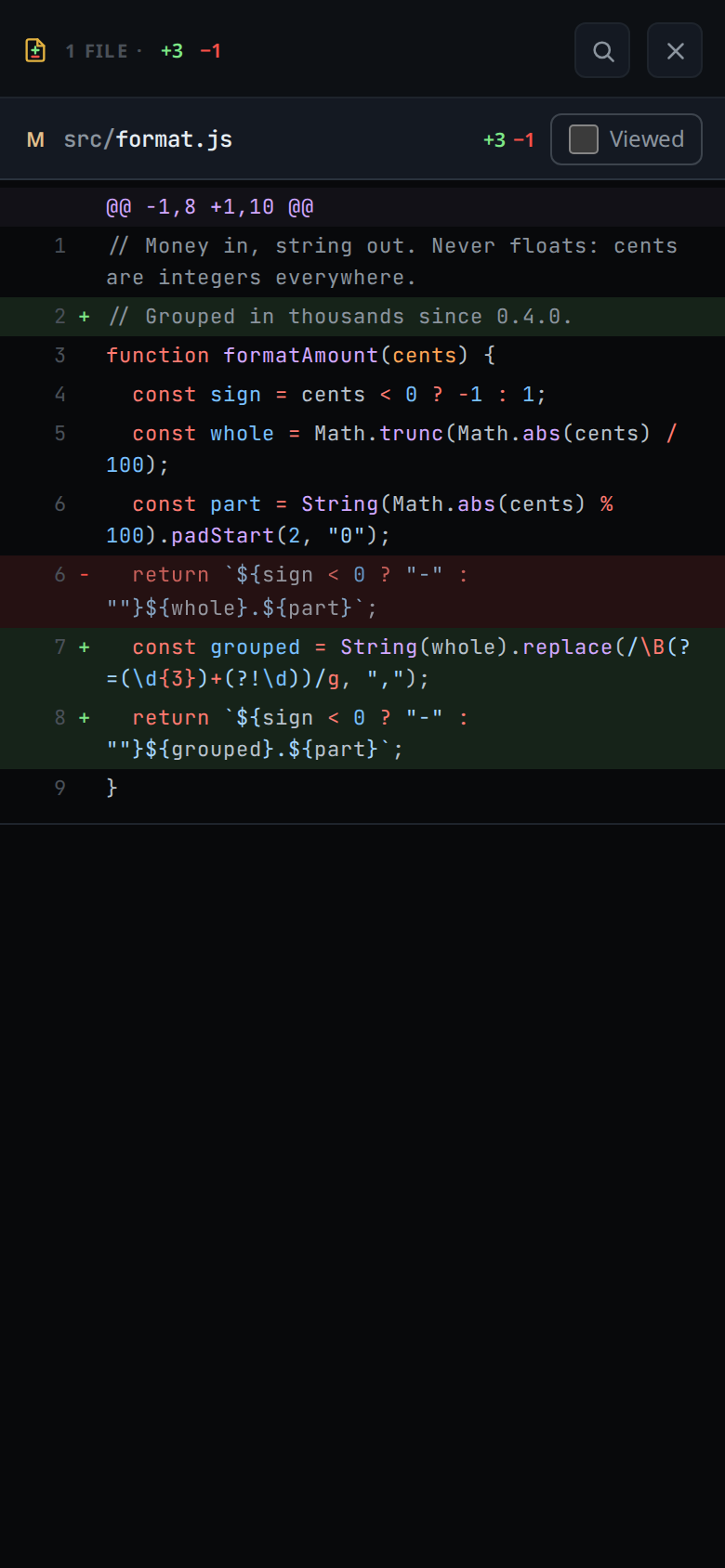
The agent's report is its own account of the work. The diff is the work. An agentic IDE puts every changed file in one place, so you read the change the way you read a pull request.
Fezu's diff sheet opens on every file a turn changed, with the counts for each file and a Viewed box to tick as you go. Hold a finger on a line of a file, tap Comment, and the comment goes to the agent with the line's text.
Permission levels and approvals
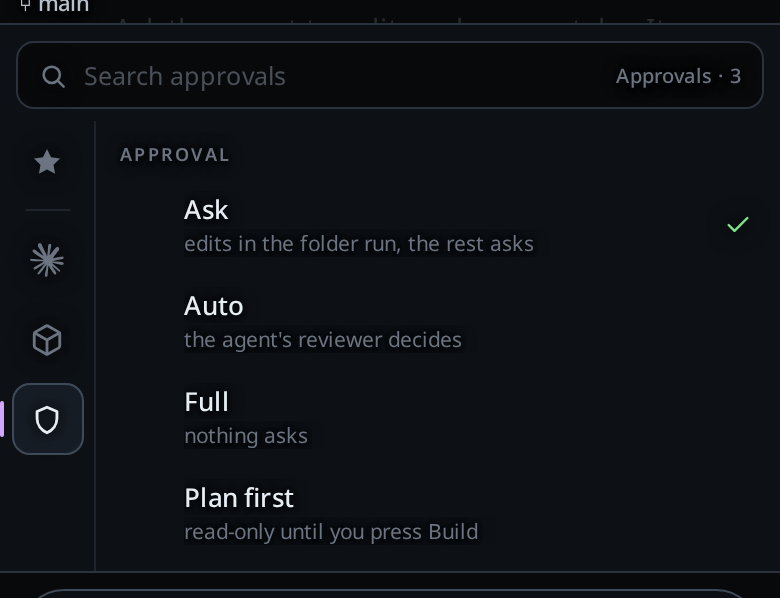
An agent that runs commands can run the wrong one. An agentic IDE lets you set how much the agent does before it has to ask you.
Each Fezu tab runs at a permission level. There are three, and the menu lists the ones the tab's agent has:
Ask: reading and editing files in the tab's folder runs. Commands, web access and anything outside the folder wait for your answer.Auto: the agent's own reviewer approves or refuses each request, and asks you when it will not decide.Full: the agent runs anything, as your user, without asking.
Plan first keeps the tab read-only until you press Build. When the agent asks, a card headed Needs you shows the command or file, with Allow, Allow for session and Deny. Ask stops mistakes. It does not stop an agent that is set on getting past it, and each agent has its own gaps, which the docs page lists.
Proof that the work is done
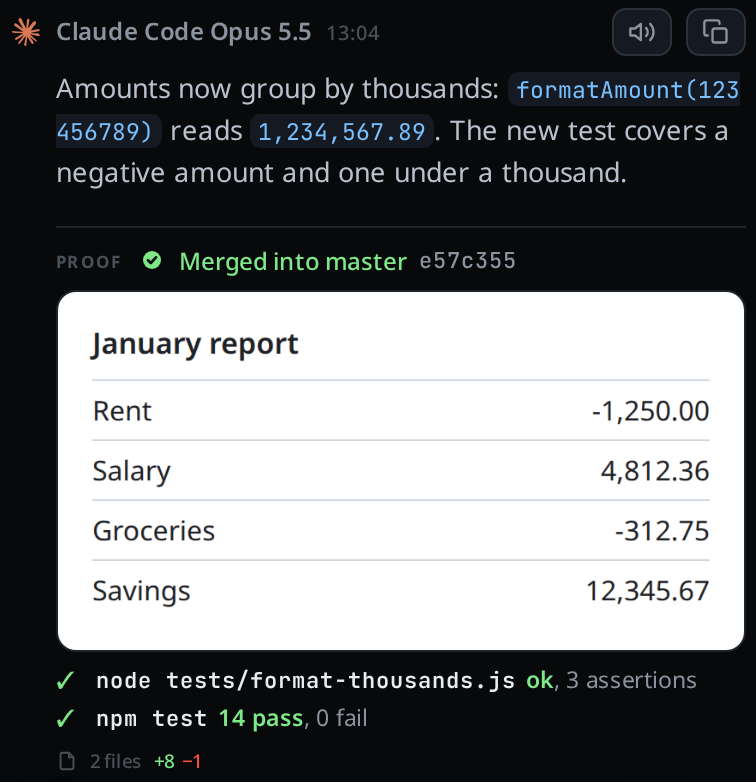
"Done" from an agent is a claim. An agentic IDE asks for the evidence and puts it next to the claim.
On Claude and Codex tabs, Fezu tells the agent to attach a proof before its final reply. The Proof section under the reply holds the screenshots, one line for each check the agent ran, and a files line that opens the diff.
Sessions in any folder, several at once
One agent on one task leaves you waiting. An agentic IDE runs several sessions and tells you which one needs you.
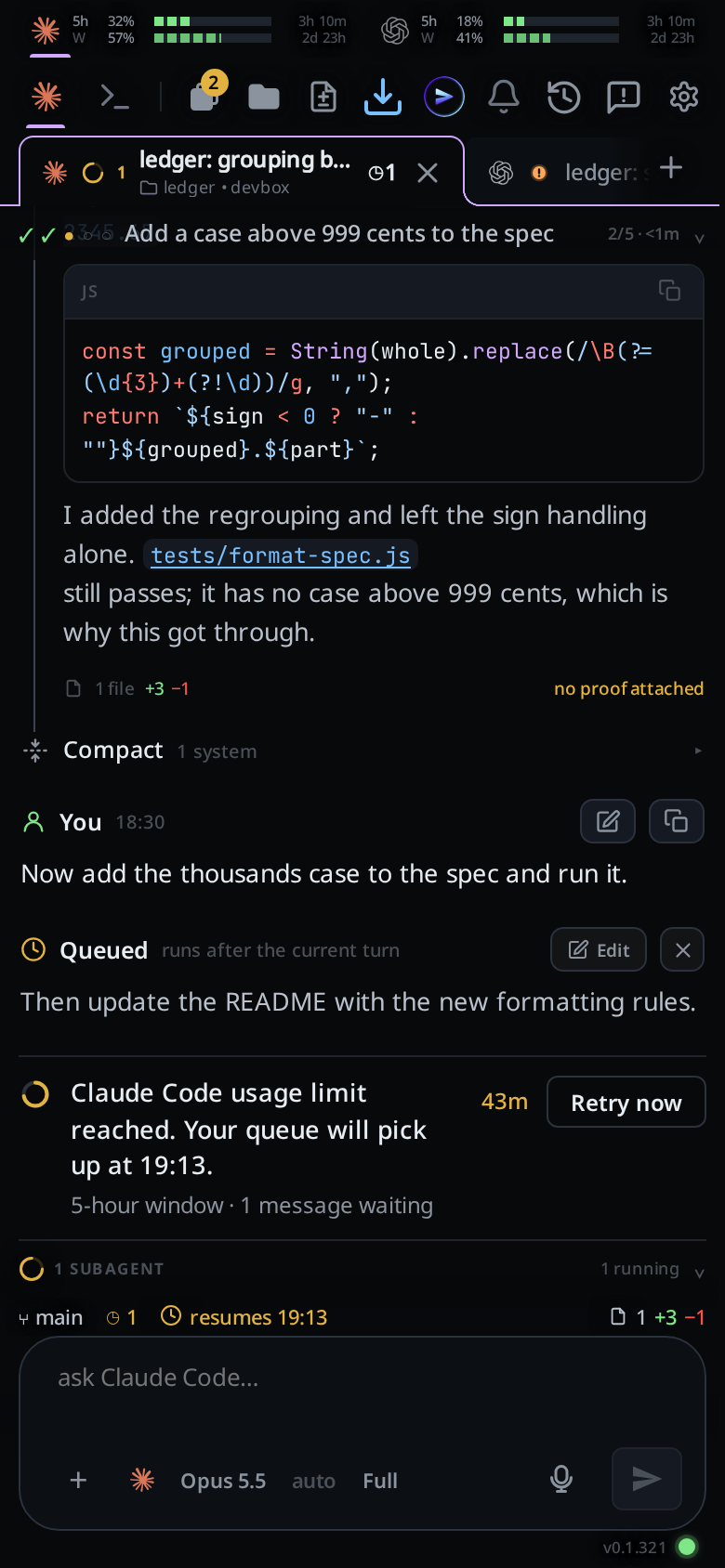
In Fezu each tab is a session with its own transcript, queue, folder and agent. You start a tab in any folder on your computer. A tab whose agent stopped for you gets an orange !, and one that finished gets a green tick; see tab status. Agents make their code changes in git worktrees unless you change the setting, so several tabs in one repository stay out of each other's way.
The files and a shell
Sometimes one word is wrong, and typing the fix is quicker than describing it. Sometimes you want to run git status yourself. An agentic IDE keeps the classic parts for those moments.
Fezu has a file explorer, a viewer and an editor, and Shell mode gives each tab a terminal in its own folder.
More than one agent
Agents differ in what they are good at, and each has its own usage limit. An agentic IDE that runs several lets you choose one for each task.
Fezu runs Claude Code, Codex, Cursor, OpenCode, Copilot, Devin, Junie, Antigravity and Muse. You can hand a tab to another agent; the new agent gets a written summary of the work so far.
Where agentic IDEs run
- On your computer. The agent works in your own folders, with the tools and logins already there. Your computer has to be on.
- In the cloud. The agent works on a copy of your repository on the vendor's machines. Nothing of yours has to stay on, but the project and its tools have to be set up there.
- On a phone. The agent and the code stay on a computer, and the phone is where you direct and review. That is a mobile agentic IDE. It is one of four kinds of mobile IDE.
Where Fezu fits
Fezu is an agentic IDE with no agent of its own. It runs the agents you already have on your own Linux PC, Windows PC or Mac, and gives all of them one screen: the same transcript, diffs, files, shell and tabs for every agent.
It is built for the phone first. You open app.fezu.dev on a phone, a tablet or a laptop, or use the desktop app. A mobile IDE for Claude Code, Codex and OpenCode walks through the setup, and An agentic IDE on iPhone and Android says what works on each phone.
Set up Fezu
You need a Linux PC, a Windows PC or a Mac with at least one agent on it.
- Open a terminal on that computer (PowerShell on Windows, Terminal on a Mac) and run the install command. On Linux or a Mac:
On Windows:curl -fsSL https://fezu.dev/install | shirm https://fezu.dev/install.ps1 | iex - When it finishes, Fezu opens. Log in or create an account with your email; we send a code to it.
- On your phone, open app.fezu.dev and log in with the same email. Your workstation is already there.
FAQ
What is an agentic IDE in simple terms?
It is an IDE where a coding agent does the work and you supervise. You state a goal, the agent edits files and runs commands until the goal is met, and the IDE shows you every step and the final diff.
What is the difference between an agentic IDE and an AI code editor?
An AI code editor suggests code while you type, and you run the tests yourself. In an agentic IDE the agent edits many files, runs the commands and reads the results by itself, then hands you a diff to review. Some products do both.
Is Claude Code an agentic IDE?
Claude Code is an agentic coding tool that runs in a terminal, in IDE extensions, in a desktop app and on the web. In a terminal it is the agent alone: you read its output as text and open the diff in another tool. An agentic IDE puts a transcript, a diff view, files, a shell and tabs around an agent like it. Fezu does that for Claude Code and eight other agents.
Is Cursor an agentic IDE?
Yes, by this definition. Cursor is a code editor with an agent built in, and Cursor's documentation says the agent completes coding tasks, runs terminal commands and edits code.
Do I still need to read the code?
Yes. The agent can be wrong, and the tests it ran may not cover the change. Read the diff before you merge, and pick a permission level that asks before commands when the folder matters to you.
Can I use an agentic IDE on a phone?
Yes. The agents run on a computer, and the phone shows the transcript, the diffs and the approvals. Fezu is built for this: you open app.fezu.dev on the phone and drive the agents on your own computer.
What does Fezu cost?
Fezu is free. You bring your own agent subscriptions.
- Run the install command in a terminal on your computer.
- Fezu opens. Log in or create an account with your email.
- Open app.fezu.dev on your phone and log in with the same email.
More guides are on the guides page.