
Permission levels and Plan first
Each tab runs at a level: Ask, Auto or Full. At Ask the agent stops and asks you before it runs a command, fetches from the web or touches files outside the folder. Plan first keeps the agent read-only until you approve its plan.
Why you would use it
You want an agent to work in a folder you care about, but not run whatever it likes while you are away from the screen. Or you want to see the plan before any file changes. Pick Ask or Plan first for that tab, and answer from your phone when it asks.
How to use it
Tap the level key in the composer (
#permpick). It readsAsk,AutoorFull, orPlanwhile Plan first is on. The menu lists the levels this tab's agent has, ticks the one in use, and ends with thePlan firstrow.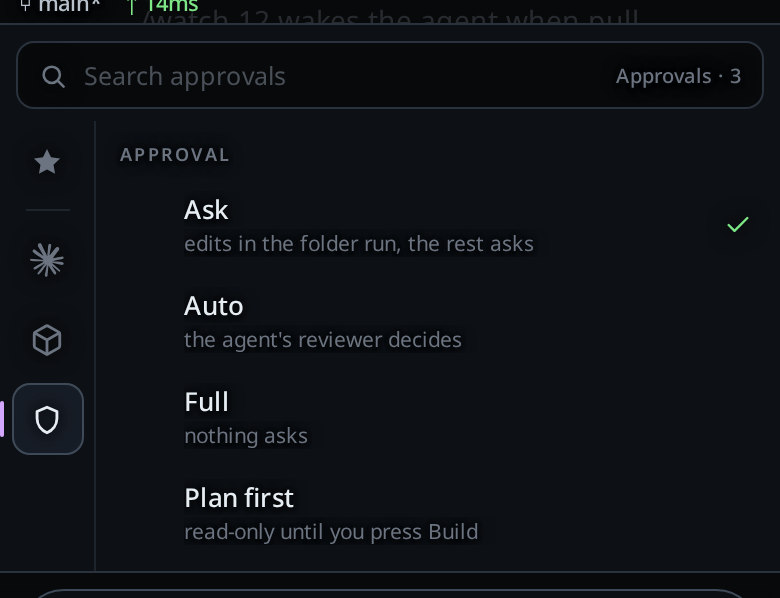
Tap a level. If a turn is running, the toast
Applies after this turnshows and the next turn runs at the new level.When the agent asks, a card headed
Needs youshows in the transcript. TapAllow,Allow for sessionorDeny.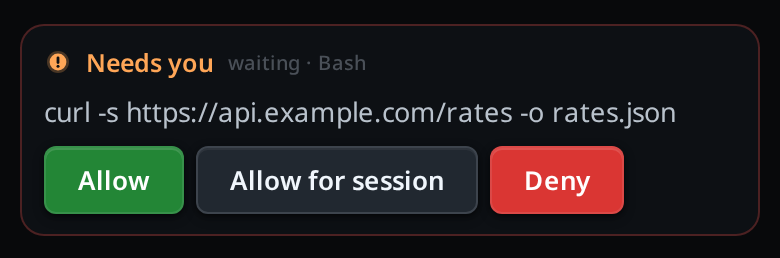
For a plan first, tap
Plan firstin the same menu, then send your request. The agent reads and plans, and its plan arrives as a card taggedPLAN. TapBuildunder it to start the work.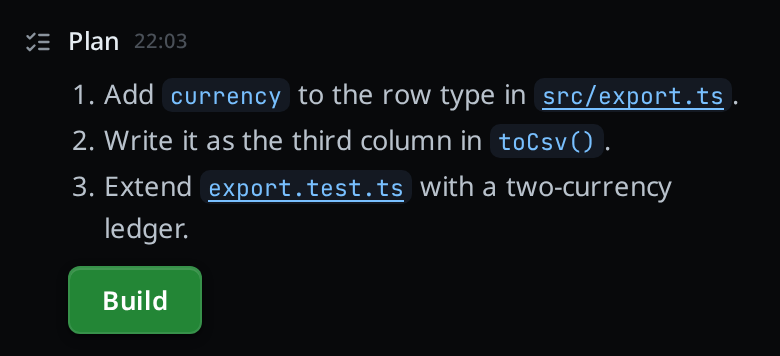
To set the level new tabs start at, open the cog (
#settings-open), tap an agent in the Agents card, and pick a level underDefault permissions(#agent-permission-claude,#agent-permission-codexand so on).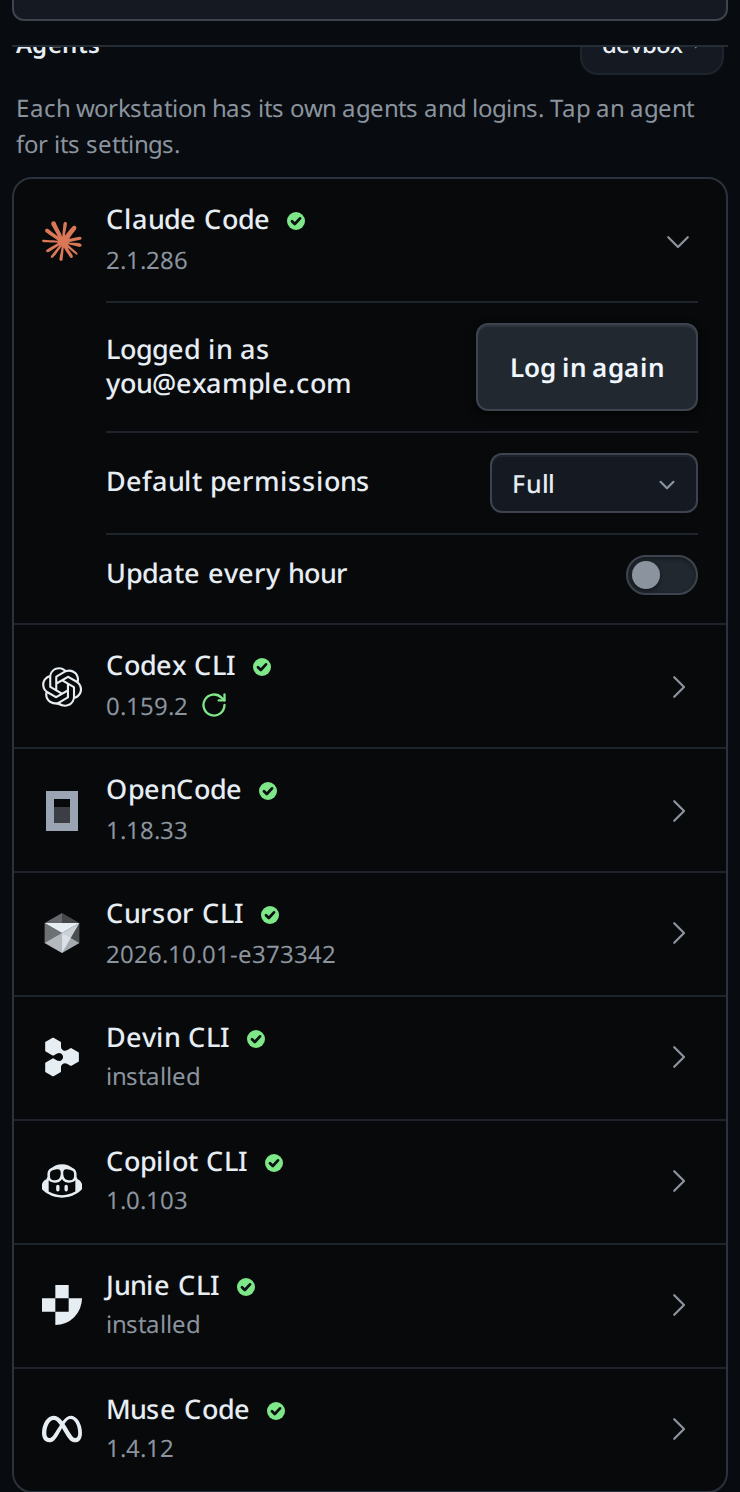
What you see
The three levels, as the menu words them:
| Level | Menu note | What happens |
|---|---|---|
Ask |
edits in the folder run, the rest asks | Reading and editing files in the tab's folder runs. Commands, web access and anything outside the folder wait for your answer. |
Auto |
the agent's reviewer decides | The agent's own reviewer approves or refuses each request, and asks you when it will not decide. |
Full |
nothing asks | The agent runs anything, as your user, without asking. |
On a Copilot tab the menu says what Copilot does instead: Ask reads
writes and commands ask, and Auto reads writes run, commands ask. See
copilot.
A request card shows the agent's own words for the request and, under them, the command or file it asks about.
Which agent has which level:
| Agent | Ask | Auto | Full |
|---|---|---|---|
| claude | yes | yes, except on Haiku 4.5 and older | yes |
| codex | yes | yes | yes |
| opencode | yes | no | yes |
| cursor | yes | yes | yes |
| devin | yes | yes | yes |
| copilot | yes | yes | yes |
| muse | yes | yes | yes |
The approval card:
- It reads
Needs you, thenwaiting · <tool>, then what the agent wants to run or touch. Allowlets this one request through.Allow for sessionalso lets the same kind of request through for the rest of the agent's session.Denyrefuses it, and the agent carries on without it.- Cursor's, Devin's and Copilot's cards have
AllowandDenyonly. - The tab waits as long as it takes. Its status is
waiting, the status bar shows● needs you, and with notifications on your phone gets one titled<tab> · needs you. - While a card is open the Steer key is hidden. Messages you send queue behind the card and run when the turn ends.
- Stop and
/cleardeny any open card.
Plan first:
- The key reads
Plan, and the menu'sPlan firstrow (read-only until you press Build) carries a green tick. Buildshows on the newest plan only, and only while Plan first is on. It turns Plan first off and queuesBuild the plan you proposed.as your next message, so the work runs at the tab's level.- To leave Plan first without building, tap the
Plan firstrow again.
When a level changes under you:
- Switch a claude tab at Auto to Haiku 4.5 or an older Haiku, by its full
id, and a system line reads, for
claude-haiku-4-5-20251001,Auto is not available on claude-haiku-4-5-20251001; this tab is on Ask now. Thehaikumodel is Haiku 5.5, which keeps Auto. A Fusion tab counts only its orchestrator's model, so a Haiku executor keeps Auto. - Hand a tab to another agent and it keeps its level, or drops to Ask when the new agent lacks it.
- A new tab starts at the default for its agent.
/newcopies the level of the tab you typed it in. - The Agent Commander starts at the default for its agent, like a new tab, and shows its cards in its own tab.
Only a phone or browser signed in to the app can answer a card, change a level,
turn Plan first on or off, or set a default. An agent, a script and the
v-code CLI on the workstation cannot. v-code settings set refuses a
permissions key with an agent cannot change permission levels; set them in the cog, and the workstation refuses the rest with Only a paired device can do this.
Options and settings
| Option | Default | What it changes |
|---|---|---|
Level key (#permpick) |
the agent's default | This tab's level, from the next turn |
Plan first |
off | This tab plans read-only until you press Build |
Default permissions (#agent-permission-<agent>) |
Full |
The level new tabs on that agent start at. It syncs to the other workstations on your account, like the rest of the cog's settings |
Limits and known gaps
Ask stops mistakes. It does not stop an agent set on getting past it. Each agent enforces its own levels, and each has gaps:
- claude at Ask runs file edits and simple file commands in the folder, such as creating, moving and copying files, without asking.
- codex at Ask writes to the system's temporary folder without asking.
- Cursor at Ask follows your own Cursor allow-list. If your Cursor settings run
everything, the tab shows the line
Cursor's own settings run everything (approvalMode unrestricted); this tab will not ask, and nothing asks. - opencode at Ask turns your own opencode deny rules into a card, so you can allow something your config denies. Your own allow rules for tools VCode does not name, such as an MCP server's tools or skills, still run without a card. Starting a subagent is a card; once you allow it, a subagent you or the project defined runs by its own rules.
- Cursor in Plan first can switch itself out of plan mode. VCode stops the turn
when it sees that and shows
cursor tried to leave Plan mode, so VCode stopped the turn, but the agent can get a step in first. - opencode in Plan first asks before every shell command, read-only ones included.
- Devin in Plan can switch its own mode out of plan. VCode stops the turn when it
sees that, before the next step can edit, and shows
Devin left Plan mode on its own, so the turn was stopped before it could edit. - Copilot in Plan can change its own mode to leave Plan. VCode stops the turn before it edits and shows
Copilot left Plan mode on its own, so the turn was stopped before it could edit. Send the message again to keep planning, or turn Plan off. - An agent at Ask can still act outside its own checks: through VCode's file
editor, a
!line, a tab it opens at Full on any of your workstations, git hooks it writes in the project, and the files on disk where VCode keeps its settings and logs. A workstation on the same account can change the synced default. - An app on an older release does not know the
permissionskey is off limits, so an agent can still set the default through it.
Related
- the-three-agents: which agent has which level
- hand-a-tab-to-another-agent: a handoff keeps the level or drops to Ask
- switch-the-model: Haiku 4.5 and older take claude off Auto
- thread-finished-notification: the push when a card waits
- queue-or-steer: why Steer hides while a card is open
- agent-commands: an agent can open and prompt tabs on your other workstations
- agent-commander: the one assistant behind the top bar's VCode icon, at the default level
- trust-model-and-security-headers: what a login is worth
- read-the-transcript: the
Needs youandPlancards among the others - devin: the Devin modes each level maps to
- fusion: a Fusion tab's executor runs under the tab's level, Auto included
- copilot: the Copilot flags and Plan mode each level maps to
- muse: the Muse profiles each level maps to