
Run Muse in a tab
A tab can run Muse, Meta's Muse Code CLI (muse). VCode drives it through
muse serve, so its answers, edits, plans, todos and approvals show in the same
transcript as the other agents.
Why you would use it
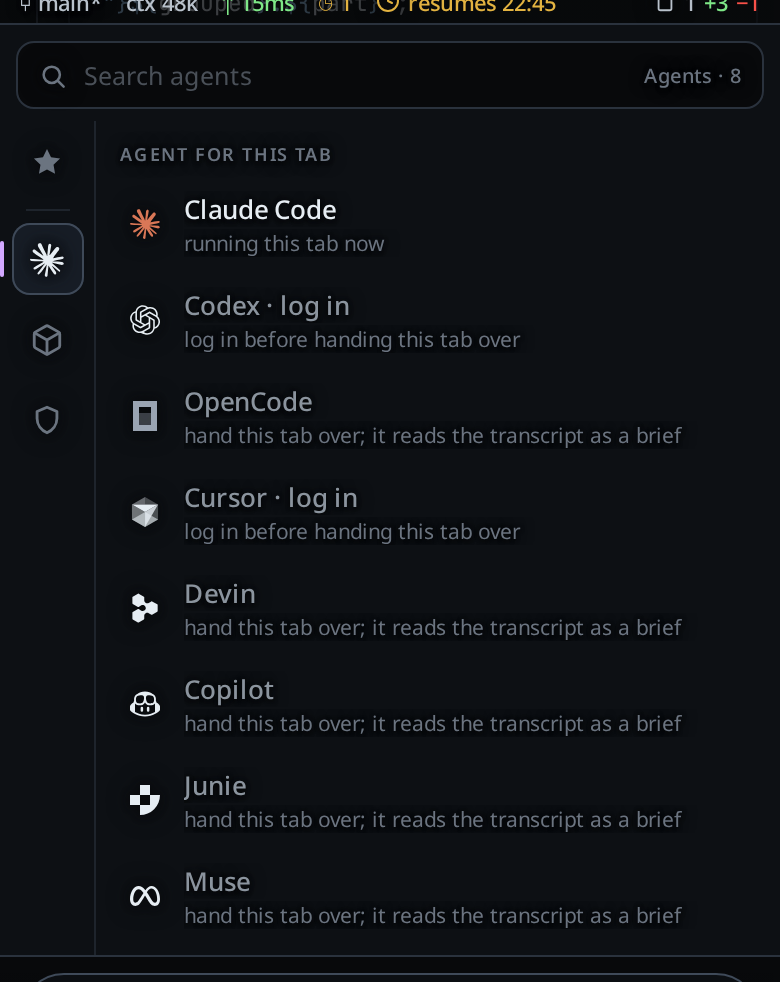
You have a Muse Code account and want to use it from the phone, with the same controls you use on a Claude, Codex, OpenCode, Cursor, Devin or Copilot tab. This page lists what Muse does in a tab and what it does not.
How to use it
- Install the CLI if the workstation does not have it. See install-an-agent.
- Log in to Muse. Muse Code needs a Meta account with a payment method. See log-in-to-an-agent.
- Start a tab with Muse as the agent, in the new-thread card or with
/new. Pick a model in the agent's menu. The list is the one Muse reports. - Set the effort on the same menu, when the model has efforts. A model's efforts are the variants Muse lists for it.
What works
- Steering. A message you send while a turn runs joins that turn. See queue-or-steer.
- Stop. Stop ends the running turn. See stop-a-running-turn.
- Model and effort. A change applies to the next message. Muse is not restarted.
- Resume after a restart. The tab picks its Muse session up again when VCode restarts. See resume-after-a-restart.
- Adopting a session. A Muse session on the workstation is listed on the resume screen. Adopting it opens a tab with the session's conversation in it. See resume-a-session-from-disk.
- Fork. A fork opens a new tab with a copy of the conversation as text. See the limits below.
- Side questions.
/btwasks a side question. See side-questions. /compact. VCode runs the compaction itself with Muse's own compact call. You seecompacting: context at 120k, thencompacted: context was at 120k.- Approvals. Below Full, a request from Muse shows as a card with
Allow,Allow for sessionandDeny. See permission-levels. If Muse refuses your answer, a row readsMuse did not take that decision (<Muse's error>); decide againand the card shows again. - Plan. Plan turns on Muse's read-only profile. The plan Muse writes becomes
the plan card; tap
Buildon it to turn Plan off and let Muse build. - Todos. The todo list Muse keeps shows in the plan strip and follows each change it makes.
- Subagents. A subagent Muse starts shows in the subagent strip.
- Images. Images you attach go to Muse inline with the message.
- Usage meter. Once Muse reports usage, the usage meters show a Muse card with a meter for its session window and one for its weekly window. Before the first report, and on an account Muse never reports usage for, there is no Muse card.
- Context meter. The tab's context figure follows the size Muse reports.
/mcp. The sheet lists Muse's MCP servers. You can log a server in and out there. See mcp-servers.
The levels
| VCode | What Muse does |
|---|---|
| Ask | Asks before it runs a request. Each request is a card. |
| Auto | Reviews each step itself and asks you only when its review says to. |
| Full | Asks nothing. |
| Plan (flag) | Muse's read-only profile, on any level. It only writes its plan. |
Changing the level restarts Muse and resumes the session with the new level.
What you see
- Ask, Auto and Plan need Muse's sandbox. Where Muse reports that its sandbox
cannot run, the tab does not start. On Windows it shows
Muse's sandbox is not set up on this computer, so Muse runs at Full only. Run `muse sandbox windows setup` at the computer, or set this tab to Full.On Linux and macOS it showsMuse's sandbox cannot run on this computer (bubblewrap is not installed), so Muse runs at Full only. Set this tab to Full.The reason in brackets is the one Muse gives:user namespaces are turned offorbubblewrap is not installed. With no reason from Muse, the line has no brackets. Plan refuses at Full too, for the same reason. - An account with no payment method ends its login with
Muse Code requires a payment method — subscribe at https://accountscenter.meta.com/muse_code/?ep=no_payg, then log in again.The card shows that line. - A login file VCode cannot read as a JSON object shows
could not read Muse's login. - Without a login the agents card shows
not logged inand a Log in button. - Each finished edit is one row:
edited 3 file(s), +12 −4. - When Muse refuses
/compact, the row readscompact failed: Muse refused the compaction (<Muse's reason>).
Options and settings
| Setting | Default | What it changes |
|---|---|---|
META_API_KEY (environment variable on the workstation) |
unset | An API key that counts as a login. The agents card names it API key, and it wins over a saved login. |
MUSE_AUTH_PATH (environment variable on the workstation) |
unset | The login file VCode checks. Without it VCode checks ~/.config/muse/auth.json, or the same path under XDG_CONFIG_HOME. |
Update every hour, agentUpdate.muse |
off | Runs muse --version with MUSE_SYNC_UPDATE=1 once an hour when no Muse tab works. See update-agents-automatically. |
Limits and known gaps
- Not in this version. Rewind, goals, workflows, computer use, plugins and recaps are not offered on a Muse tab.
- Edits show as counts. A row gives the number of files and the lines added and removed. VCode shows no diff for a Muse edit.
- Fork and side questions copy text. Muse's own fork does not work on Linux, so a fork gives the new session the conversation as text. The copy is a new session, not the old one. A side question is a read-only one-shot run that gets the conversation as text.
- A logged-out Muse lists no models. The model menu is empty until you log in.
- MCP servers: log in and log out only. A Muse row offers Authenticate when it needs a login and Log out when it is logged in. There is no reconnect, no turn off or on, and no remove, because Muse's protocol cannot change its servers. A server added for one session only offers neither.
- Adoption imports the last 200 items of the session at most. The agent still has the whole session.
- The resume list is at most a minute old. VCode reads Muse's session list at most once a minute. A list that takes longer than 10 seconds keeps the rows it had.
- Instructions ride in the first message. VCode's instructions go to Muse inside
a
<vcode-system>block at the top of the first message of a new session. See what-the-agent-is-told. - Binary lookup. On Linux and macOS VCode uses
museonPATH, then~/.local/bin/muse. If neither exists the tab fails withmuse is not installed (looked on PATH and in ~/.local/bin). On Windows it looks for the newest build in%LOCALAPPDATA%\Programs\muse, and fails withmuse is not installed (looked in %LOCALAPPDATA%\Programs\muse).
Related
- the-three-agents: the agents and what each one can do
- copilot: the GitHub Copilot tab
- devin: the Devin tab
- permission-levels: the levels and Plan
- switch-the-model: the model and effort menu
- resume-a-session-from-disk: finding and adopting sessions
- install-an-agent: installing the CLI from the phone
- log-in-to-an-agent: the login that Muse runs
- mcp-servers:
/mcpon a Muse tab, with its two operations - update-agents-automatically: the hourly update check