
Find and resume any session
The resume screen finds any session on this box by what was said in it. An open tab, a closed tab and a claude or codex session you started in a plain terminal are rows of one list. Pick one to go back to it, or fork it into a new tab.
Why you would use it
You remember the conversation, not the tab. Maybe you closed it last week, or you started it at the desk in a terminal you cannot reach from the phone. Type a few words you remember and the session comes up, with its last turns beside it.
How to use it
Open the resume screen (
#resume) any of these ways:- type
/resume(or/sessions) in the composer (#draft) and send it - press Ctrl+O (⌘O on a Mac)
- tap Resume… (
#sessions-resume) in the head of the Threads sheet
- type
Type in the search box (
#resume-q,search sessions…). The list (#resume-rows) follows as you type. Every word must appear in the session's title or in what was said; case does not matter.Tap the scope chip (
#resume-scope) to change where it looks. In a project it starts onThis project, thenThis folder(the folder of the tab you are in) andThis box. In Worktop it starts onThis box.Tap a row to select it. Its last turns show in the preview (
#resume-preview): below the list on a phone, beside it on a wide window. With a keyboard, the up and down arrows move the selection.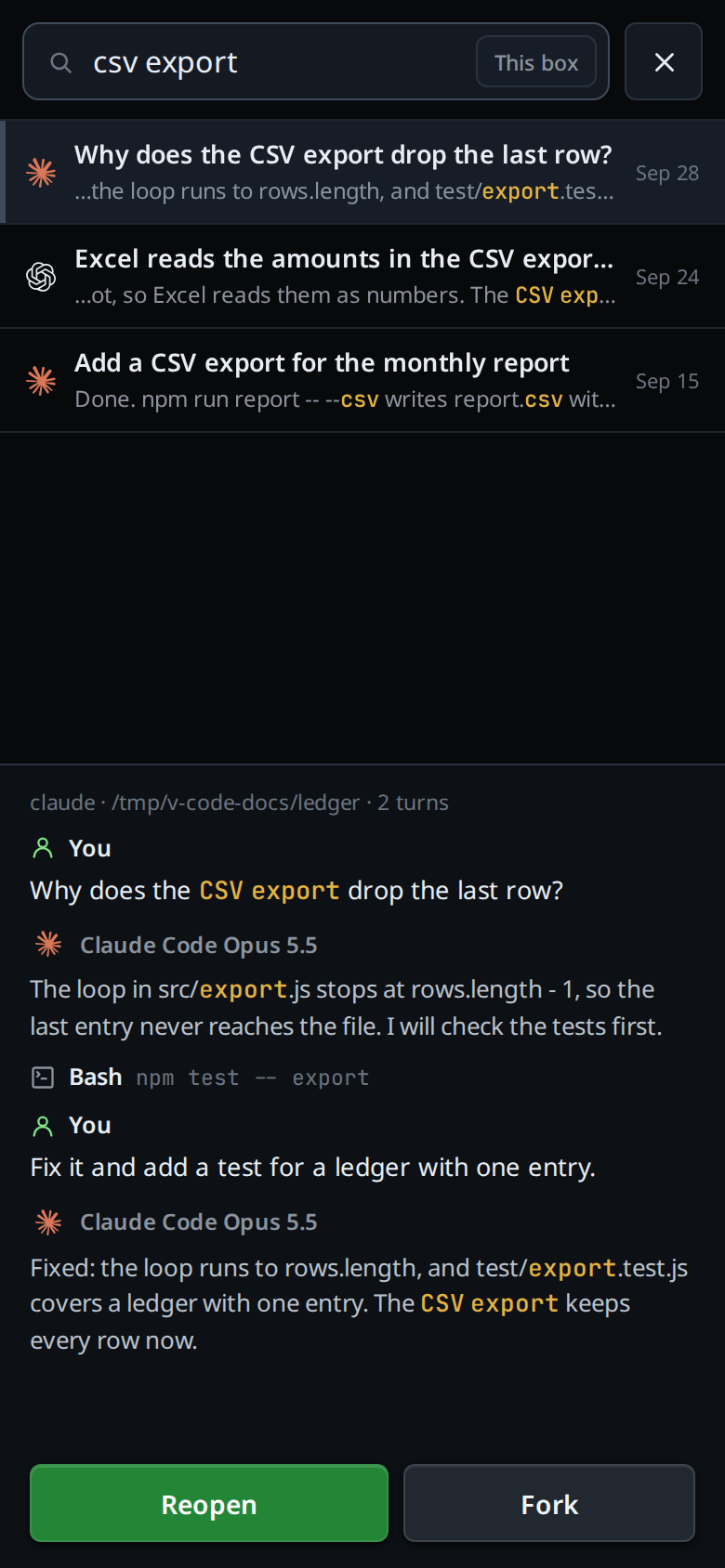
Tap Reopen (
#resume-open), tap the selected row again, or press Enter.- An open tab: the button reads Open, and you switch to that tab.
- A closed tab: it comes back with its whole log, in the project it was started in.
- A session started in a terminal: its transcript is imported into a new tab in the active project, and your next message continues that session.
Or tap Fork (
#resume-fork). A new tab opens in the active project on a copy of the session. The agent keeps the whole context, and the session you forked from stays as it was.With either button, if you opened the screen on an empty tab, one where nothing has been said yet, the session takes its place: the empty tab closes once the session is open.
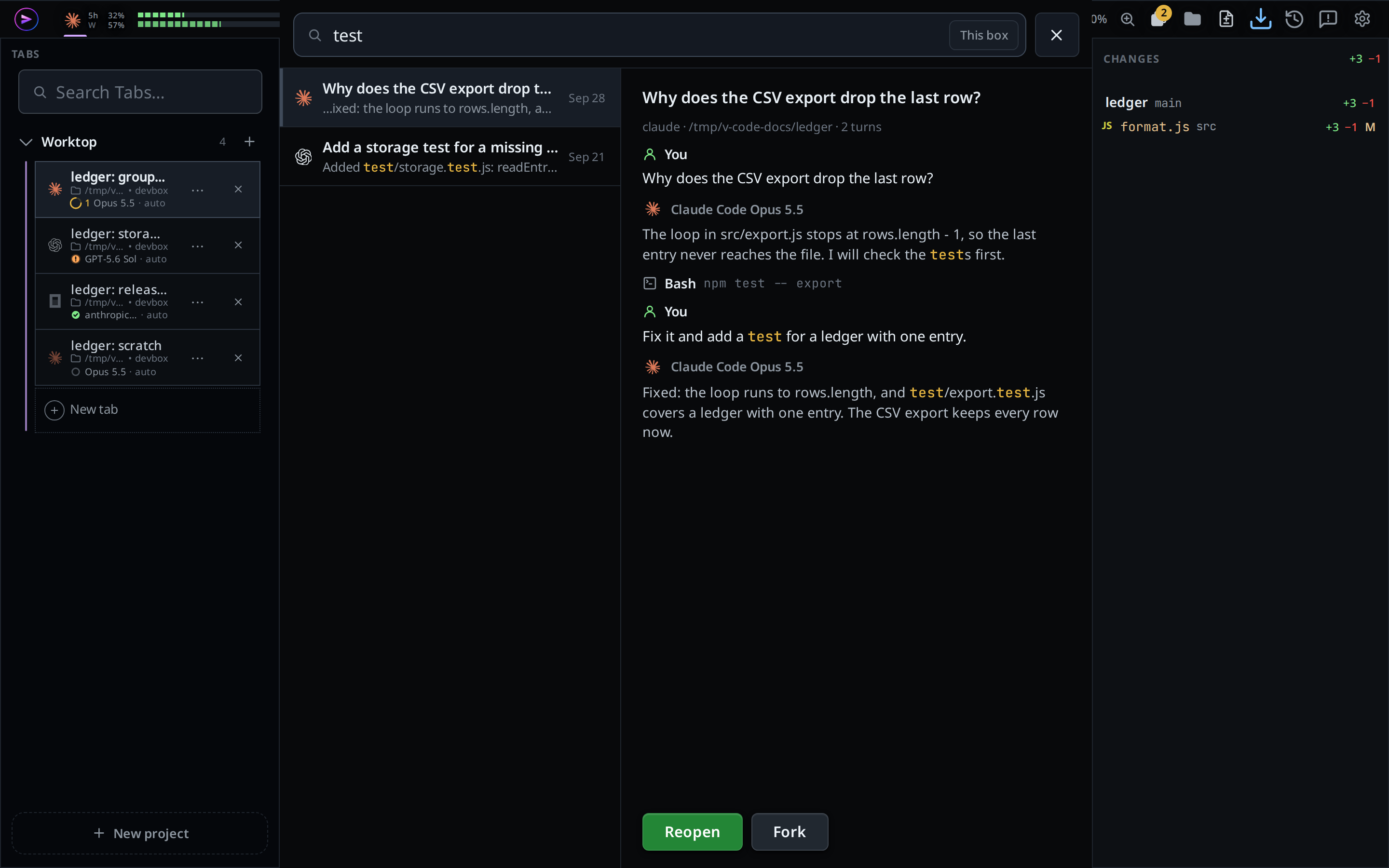
Tap the cross (
#resume-close), press Escape or press the phone's back button to close the screen without picking anything.
What you see
Each row has the agent's mark, the title, one line from the session and the
time on the right. The title is the tab's name when a tab holds the session,
else the first thing you typed in it. The line is the agent's last reply; with
a search it is the part of the newest message that matches, with your words
marked and … where it was cut. The time is the clock for today, the weekday
for the last six days, Oct 3 for earlier this year, else the full date.
A row whose folder is not the project's main folder carries the folder as a tag: the path below the main folder for a worktree, else the whole path.
The preview starts with a line of <agent> · <folder> · N turns, under the
title on a wide window, then the last turns, each tagged as in the transcript:
what you typed under You, each reply under the agent's mark and name with the
model that wrote it (for example Claude Opus 5.5), and each tool call as its
tag and what it did (Bash npm test).
Until the box answers, the list reads searching…. While the box builds its
index for the first time, the end of the list reads
indexing… N files and the list fills in as it goes. With no match it reads
no sessions match.
Fork shows forking claude session…, then forked · 132 of 410 items. Reopen
on a terminal session shows resuming claude session…, then
resumed · 132 of 410 items. The new tab opens with a system note:
resumed claude session a1b2c3d4, showing the last 132 of 410 items; the agent still has the full session,
or for a fork forked from claude session a1b2c3d4, showing the last 132 of 410 items.
When nothing was left out it ends : 132 items imported.
Limits and known gaps
- This box only: the box of the active project. Sessions on your other boxes are not searched.
- Search covers what you typed and the agent's text replies. Tool output is not searched.
- Only the first 4000 characters of each message are searched. A long pasted log or plan is not searched past that point.
- At most 50 rows are shown, newest first. Narrow the search to find an older one.
- Sessions started in a terminal are read for claude, codex and copilot only. An opencode or cursor tab is still listed, matched on its name alone. Devin's and Muse's lists come from the CLI itself, so a session of either started in a terminal is listed too.
- Fork works on claude, codex, devin and muse sessions only; on other rows the button is off. A Devin fork is a new session that gets the conversation as text, at most 24000 characters, newest first.
- A Devin row carries only its title, so a search matches the title and not the conversation.
- Devin's list is read at most once a minute. A read that takes longer than 10 seconds keeps the rows it had.
- A Devin session open in another
devinprocess cannot be adopted or forked. The resume screen refuses withthe devin session <session id> is open in another devin process (pid <pid>); quit it there first. - The box does not check whether a terminal is still running the session. Reopen one that is still open in a terminal and both write to the same session.
- A session still running in a terminal is not followed live. The tab shows the transcript as it was when you opened it.
- At most 200 items are imported into the tab. The agent keeps its whole
session either way. A tool call whose result fell outside the imported window
shows the output
(result is outside the imported window). - A claude session you rewound (claude's
/rewind, or editing an earlier message) shows the turns the agent still has, in the preview and in the tab Reopen makes. The turns you went back past are left out, and a search does not find words that only they hold. The turn count and the title follow the same turns. Everything before the last compaction is shown as it was written. - A codex session you rewound shows the turns from before the rewind, and a codex fork shows only the turns made after the fork. The agent has the right history either way.
- Agent Commander tabs and their sessions are not listed.
- A session with no prompt you typed is left out.
- A session whose folder is gone (a removed worktree) cannot be forked, or
reopened when it was started in a terminal:
no such folder: <path>. - Near the memory cap, Fork and Reopen
on a terminal session are refused with
memory 14.2 of 16.0 GB used: close a tab first. - On a box running an older VCode the list reads
this box runs a VCode too old for the resume screen; it gets it with its next update. /resumewith an argument is not the command; it is sent to the agent as a message.
Related
- threads-sheet: the Resume… button
- close-and-reopen-tabs: closing a tab, and reopening it here
- resume-after-a-restart: what happens to a tab when VCode itself restarts
- the-three-agents: which agents keep sessions the box can read
- devin: running a Devin tab, including an adopted Devin session
- copilot: running a Copilot tab, including an adopted Copilot session
- muse: running a Muse tab, including an adopted Muse session
- slash-menu: where
/resumeis listed - change-keyboard-shortcuts: rebind Ctrl+O
- work-in-worktrees: the worktree folders a row is tagged with
- rewind-the-conversation: go back to a reply inside a tab instead of forking the session