
Run GitHub Copilot in a tab
A tab can run GitHub Copilot, the Copilot CLI (copilot). VCode drives it
over the CLI's copilot --acp mode, so its answers, edits, plans, todos and
approvals show in the same transcript as the other agents.
Why you would use it
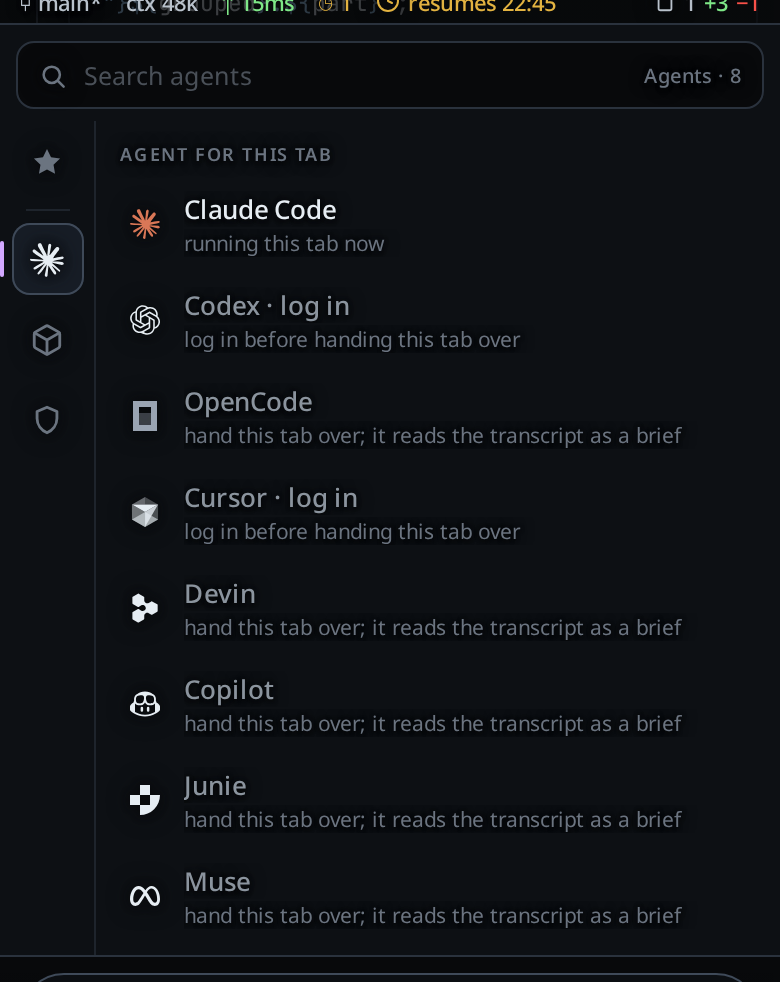
You have a GitHub Copilot plan and want to use it from the phone, with the same controls you use on a Claude, Codex, OpenCode, Cursor or Devin tab. This page lists what Copilot does in a tab and what it does not.
How to use it
- Install the CLI if the workstation does not have it. See install-an-agent.
- Log in to GitHub. Copilot does not run without a login. A workstation where
the GitHub CLI (
gh) is logged in counts as logged in. See log-in-to-an-agent. - Pick Copilot in a tab's agent menu (
#agentpick, under the message box). A new tab, from the new-thread card or/new, starts on the agent of the tab you were in, so start it from a Copilot tab to stay on Copilot. Pick a model in the model menu (#modelpick).Autolets Copilot choose. - Set the effort on the same menu:
none,minimal,low,medium,high,xhighormax.Autohas no effort.
What works
- Steering. A message you send while a turn runs joins that turn. See queue-or-steer.
- Stop. Stop ends the running turn. See stop-a-running-turn.
- Resume after a restart. The tab picks its Copilot session up again when VCode restarts. See resume-after-a-restart.
- Adopting a session. A Copilot session on the workstation is listed on the resume screen. Adopting it opens a tab with the session's conversation in it. See resume-a-session-from-disk.
/compact. VCode sends/compactto Copilot, and Copilot compacts its own context. You seecontext compactedwhen it is done.- Approvals. Below Full, a request from Copilot shows as a card with
AllowandDeny. ADenyends Copilot's turn. See permission-levels. - Plan. Plan turns on Copilot's plan mode. The plan Copilot writes becomes
the plan card; tap
Buildon it to turn Plan off and let Copilot build. - Todos. The todo list Copilot keeps shows in the plan strip and follows each change it makes. A blocked todo shows as not started.
- Subagents. A subagent Copilot starts shows in the subagent strip.
- Images. Images you attach go to Copilot inline with the message.
- Context meter. The tab's context figure follows the size Copilot reports.
The levels
| VCode | What Copilot does |
|---|---|
| Ask | Asks before it writes a file or runs a command. Each request is a card. |
| Auto | Writes files without asking. Asks before it runs a command. |
| Full | Asks nothing. |
| Plan (flag) | Copilot's plan mode, on any level. It only writes its plan. |
What you see
- An effort the model does not offer is refused with
model <model> does not support effort <effort>; supported: <efforts>. Autorefuses an effort withmodel auto has no effort levels.- When Copilot changes its own mode to leave Plan, VCode stops the turn before
it edits and shows:
Copilot left Plan mode on its own, so the turn was stopped before it could edit. Send the message again to keep planning, or turn Plan off. - Without a login the agents card shows
not logged inandLog in, and the agent menu showsCopilot · log in.
Options and settings
| Setting | Default | What it changes |
|---|---|---|
COPILOT_BIN (environment variable on the workstation) |
unset | The path to the copilot binary. It wins over every other place VCode looks. |
COPILOT_HOME (environment variable on the workstation) |
~/.copilot |
Where Copilot keeps its sessions and login. VCode reads sessions and todos there. |
Update every hour, agentUpdate.copilot |
off | Runs copilot update once an hour when no Copilot tab works. See update-agents-automatically. |
Limits and known gaps
- A model change restarts the process. Copilot takes its model and effort when it starts, so a change starts it again on the same session.
- A model your plan lacks is replaced. Copilot runs another model in its place without saying so, and the reply rows still name the model you picked.
- Plan asks first. In Plan Copilot asks before every command, so it asks to
make its session folder before it writes the plan file. Tap
Allow. - No fork, no side questions, no
/mcp, no rewind. These are not offered on a Copilot tab yet. - No usage meter. Copilot reports no account quota here, so the usage meters have no Copilot row. The context meter still works.
- Copilot cannot ask you a question. It has no question tool in this mode, so it asks in its reply instead.
- Instructions ride in the first message. VCode's instructions go to
Copilot inside a
<vcode-system>block at the top of the first message of a new session. See what-the-agent-is-told. - Adoption imports the last 200 items of the session at most. The agent still has the whole session.
- Binary lookup. On Linux and macOS VCode uses
COPILOT_BINif it is set, thencopilotonPATH, then~/.local/bin/copilot, then the newest~/.nvmnode folder that has one. If none exists the tab fails withcopilot is not installed (looked on PATH, in <folder> and in ~/.nvm). On Windows it usesCOPILOT_BIN, then the WinGet link in%LOCALAPPDATA%\Microsoft\WinGet\Links, thencopilotonPath. If none exists the tab fails withcopilot is not installed (looked in %LOCALAPPDATA%\Microsoft\WinGet\Links and on Path).
Related
- the-three-agents: the agents and what each one can do
- permission-levels: the levels and Plan
- switch-the-model: the model and effort menu
- resume-a-session-from-disk: finding and adopting sessions
- install-an-agent: installing the CLI from the phone
- log-in-to-an-agent: the device-code login
- update-agents-automatically:
copilot updateon a schedule - muse: running a Muse tab