
Switch the model for a tab
Each tab runs one model. Change it by tapping the model button under the
composer, or by typing /model.
Why you would use it
The tab was opened for a quick question on the cheap model and has turned into real work. Or the reverse: you are on the expensive model and about to ask something trivial. The model is per tab, so one tab can grind on a big refactor while another answers quick questions.
How to use it
Tap the model button (
#modelpick) in the row under the composer, between the agent's name and the effort. It shows the model this tab runs, orauto.The slash panel opens on its Models slot: a search bar reading
Search modelsandClaude · 5, and the list of models under the agent's name, with a green tick on the one this tab is already using. Tap another, or type in the search bar to filter. A search also lists the matching models of every other agent on this box, each under its agent's name, and the count readsAll. Tapping one hands the tab to that agent on that model, atautoeffort. On a model with effort levels, theEffortslider sits over the search bar; see set the effort. On a model with fast mode, theFastswitch sits under it; see fast mode.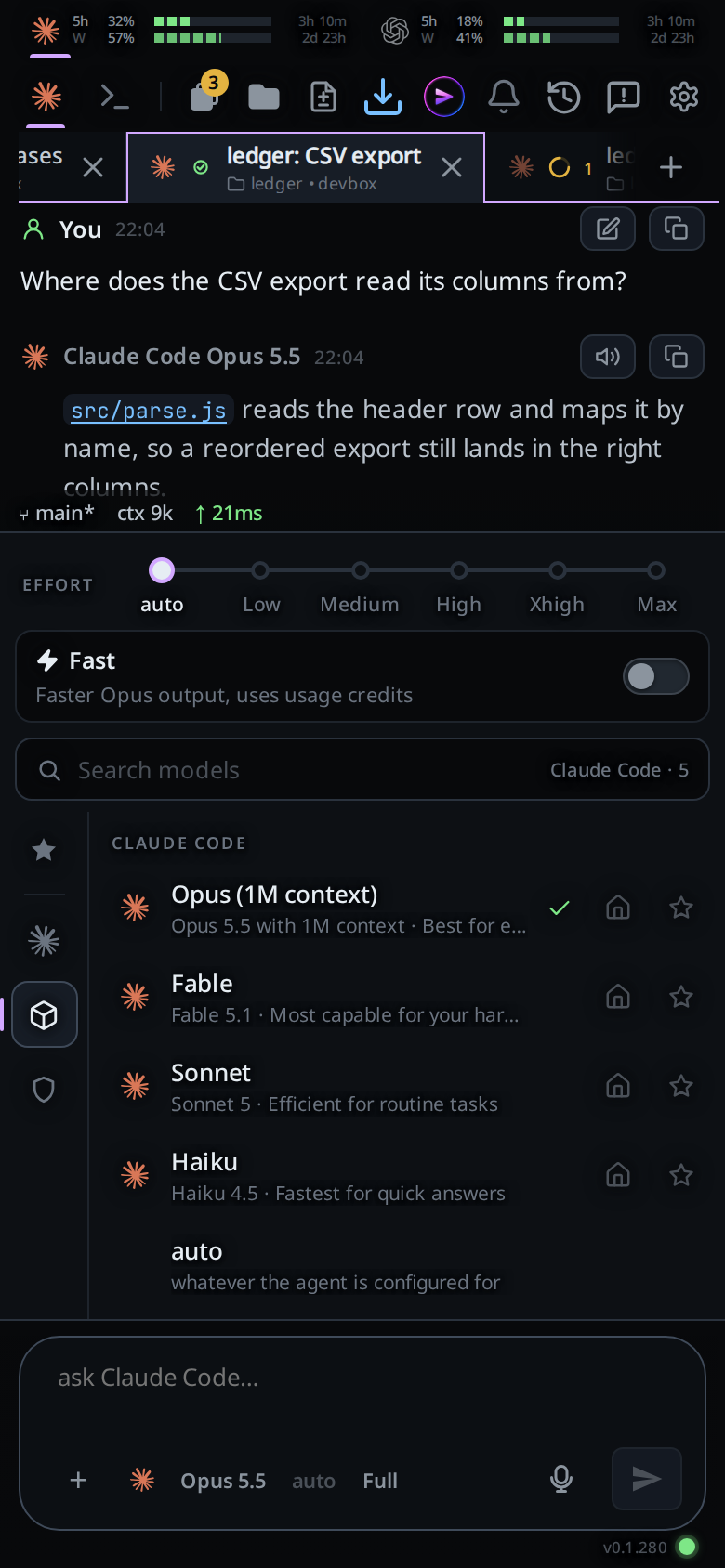
Choose the model and effort, then star the model to save its harness, model and effort in Favourites. Your favourites lead the Models list under
Favourites, from every harness, so one tap restores a saved configuration. The Favourites slot lists them too. Each favourite shows its effort on the right: the level's name and five rising bars, grey forlowup through green, yellow and orange to red formax.autoleaves the bars unlit. A star on another model saves it at auto effort. The house beside the star makes a model the one new tabs open on; see default-start. See the slash menu.
The list is what the agent's own CLI offers on this machine, so a new model
shows up without an update to VCode. Type /refresh-models to ask the CLIs
again now; see update-from-a-tab.
Or, by typing:
- Type
/model. The menu becomes the same list of models as soon as the word is finished (no space needed) and keeps filtering as you type a value, across every agent the same way. Typing/modelwhile the panel is already open from the model button hands the panel to the draft. It works at the end of a message already written: picking a model there sets it and takes/modelout of the draft, leaving the message. - Send
/modelon its own to see what the tab is on instead. - Type
/model sonnetand send it to set it directly. The name the menu shows works too:/model Sonnetresolves tosonnet.
Both the picker and the typed command go through the same place, so they cannot mean different things.
What you see
- The button's label is the model's product name, not a caption:
Opus 5.5,GPT-5.6 Sol, orautoin a dimmed style when nothing is set. - Long ids are shortened for the label:
claude-opus-5-5[1m]reads asOpus 5.5, a trailing snapshot date is dropped, andgpt-5.6-solreads asGPT-5.6 Sol. - Each row shows the model's name and the note its CLI gives it:
Sonnet,Sonnet 5 · Efficient for routine tasks. - The model this tab is on carries a green tick on the right of its row. It
follows
what the tab is really running:
autoholds the tick only until the first turn, after which the agent reports the id it started with and that model's row takes it. - A full model id is ticked on its row. Running
claude-fable-5-1ticksFable. - Only one row is ticked. When the menu lists both
Opus 5.5andOpus 5, runningclaude-opus-5ticksOpus 5alone. A release with no row of its own ticks its family's alias row. - The tooltip is
Model: opus, orModel: whatever the CLI is configured forwhen nothing is set. /modelwith no argument answers with a toast:model: opus, ormodel: default.- A second tap on the button closes the menu.
Options and settings
Every agent's list comes from its CLI on this machine, as the account it is
logged into sees it. Each list ends with auto (whatever the agent is configured for), which sends no model and leaves the choice to the CLI.
| Agent | Where the list comes from |
|---|---|
| claude | The models the CLI offers this login, with the names and notes it gives them (opus[1m] is Opus (1M context)) |
| codex | The models the CLI lists for this account; hidden ones are left out |
| opencode | The models of the providers it is logged into |
| Cursor | The model IDs and names ACP advertises; the picker sends the exact ID, and auto uses ACP's default[] |
| devin | The models devin models list names, narrowed to the ones your account's session allows. Each effort is a variant of the model, and the picker sends the variant's ID |
| copilot | The models in the model section of copilot help config, with Auto first. Every model but Auto takes the efforts none, minimal, low, medium, high, xhigh and max |
| muse | The models model/list names on a muse serve of its own, with each model's efforts as its variants. Logged out, Muse lists none |
The box asks each CLI once and keeps the answer for an hour. After that the
next look at the list is served the old answer while the box asks again in the
background. /refresh-models asks at once. Devin's list is kept until
/refresh-models asks again; the list of Devin's families is kept for 10 minutes.
Limits and known gaps
Tapping the ticked row is not a no-op: it sends the row's id again, and on claude that restarts the agent process.
A CLI that is missing, logged out or slow to answer gives an empty list. The menu then offers
autoalone, and the phone asks again a few times.The setting is per tab, not global. A new tab opened with
/newcopies this tab's model.The value sent to the CLI is the row's id (
opus[1m]), not its name; the row's tooltip shows what will be sent.On claude and opencode the model is a process flag, so the agent process is stopped and the next turn starts a new one. Nothing is lost: that start resumes the same vendor session.
A change made mid-turn is held. The process that owns the turn keeps it, and the restart happens before the next turn.
On devin a model change restarts the agent process, and the next load sets the model again.
A model your Devin plan cannot run is refused with
devin cannot run <model id> on this account; it offers <model ids>. The Free plan runs one model.On copilot a model or effort change restarts the agent process. Copilot takes both when it starts, so a change starts it again on the same session.
On copilot a model your plan lacks is replaced. Copilot runs another model in its place without saying so.
On muse a model or effort change applies to the next message, with no restart.
On codex the model rides on
turn/startas an override, so it lands on the very next message with no restart.A new model reaches the menu within the hour after its CLI offers it. An update to the CLI itself comes from
/update, or from the CLI's own updater.The button is disabled with no tab open.
Choosing a model from the menu does not clear your half-written message. Only when the draft is the command (
/model …) is the box emptied.
Related
- default-start: the house beside each star, which new tabs open on
- set-the-effort: the dial beside it
- fast-mode: the Fast switch under the effort slider, on the models that have it
- slash-menu: the menu both controls open
- the-three-agents: which agents apply a model without restarting
- hand-a-tab-to-another-agent: changing the agent, which changes the models on offer
- new-tab-command: the
/newthat copies this tab's model - status-bar: where the running model is reported
- update-from-a-tab:
/refresh-modelsand/update - permission-levels: the level key beside it; Haiku 4.5 and older take claude off Auto
- devin: Devin's models and efforts
- fusion: run a Claude tab on two models, one that plans and one that edits
- copilot: Copilot's models and efforts
- muse: Muse's models and efforts