
Open new tabs on a default model
Tap the house beside one model in the model panel, and every tab you open starts on that agent, model and effort. Without one, a new tab copies the last tab in its project.
Why you would use it
You switched a tab to a bigger model for one hard job, and now every new tab in that project copies it. Or you work on several computers and want each one to start new tabs the same way. The default stays put until you change it.
How to use it
Open the model panel: tap the model button (
#modelpick) or type/model.Pick the effort with the slider, then tap the house beside a model's star. The house fills blue, its door still drawn. The model is starred too if it was not, and it shows under
Favourites.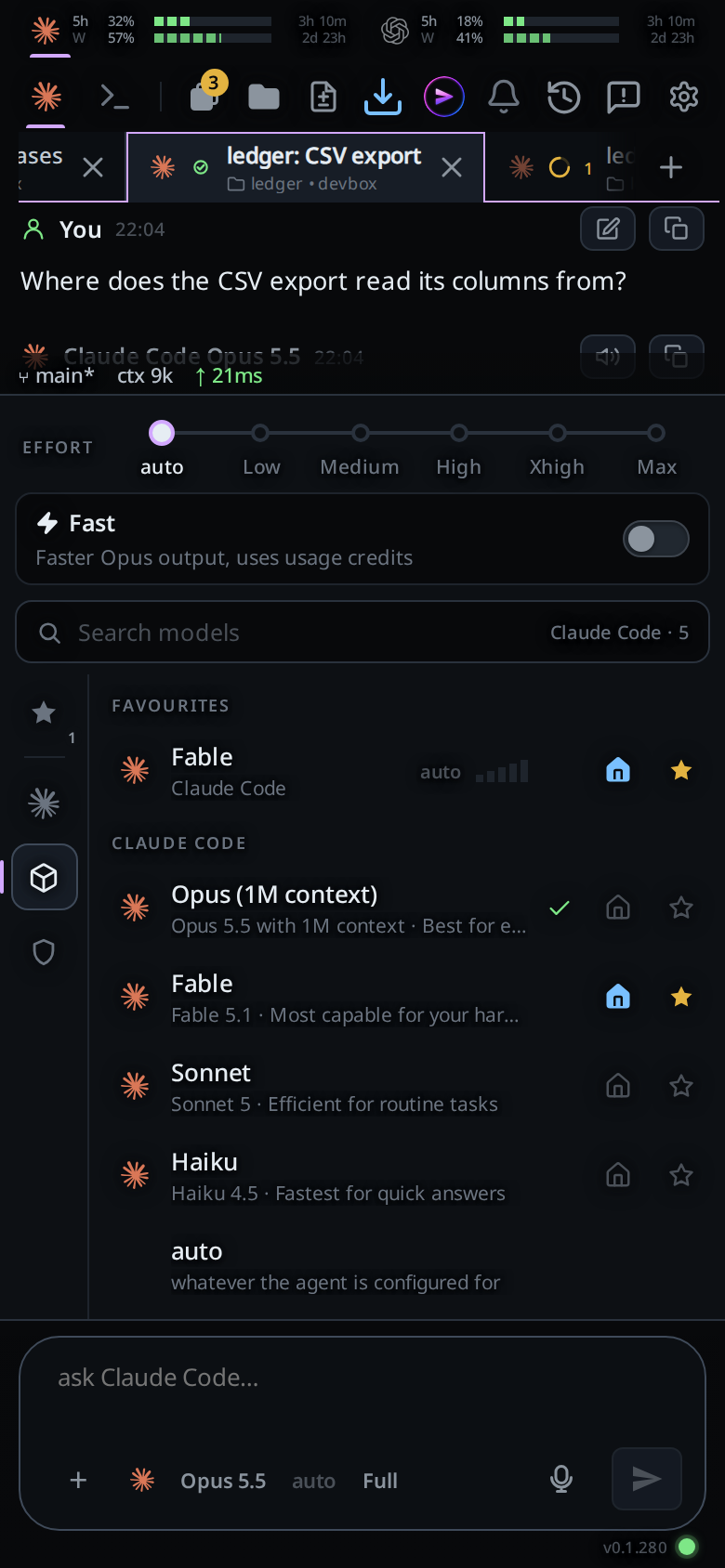
Open a tab with +,
/new, or Start thread on the new-thread card. It starts on that agent, model and effort.To see or clear it, tap the cog (
#settings-open). The Tabs group'sNew tabs start withrow names it.Clear(#tabs-default-clear) removes it;Change(#tabs-default-change) opens the model panel, where you tap the house beside another.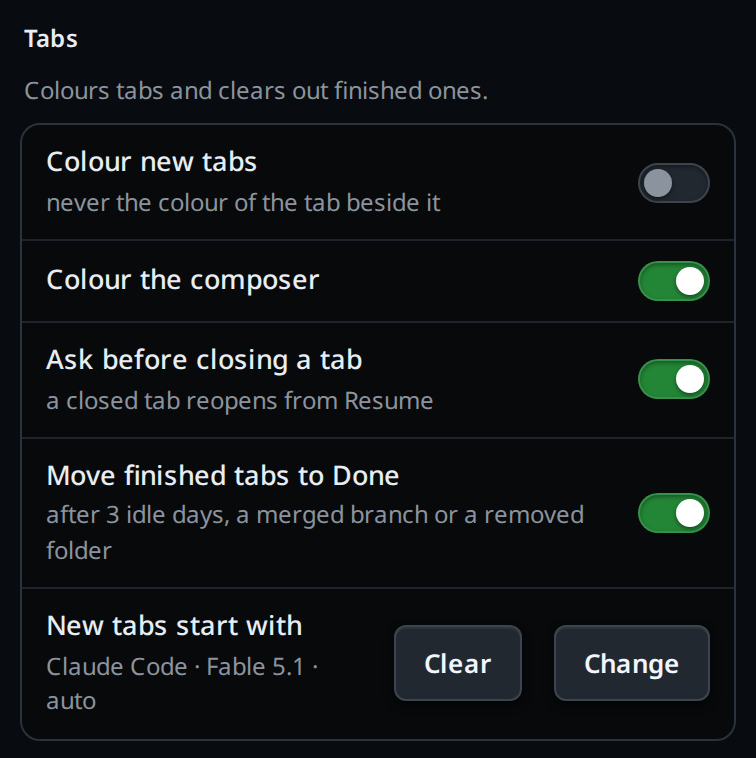
Tap the filled house again to stop opening new tabs on it. Unstarring the model does the same.
What you see
- The house is a grey outline on every model row, and filled blue on the default. Commands and skills have none.
- Hovering the house says
Set as default, orRemove as defaulton the default. Hovering the star saysSet as favourite, orRemove from favouriteson a starred model. - With no default, the cog's row reads
the last tab in the project, and there is noClear. - The default is part of your favourites, so every computer on your account uses it.
When a computer cannot start the default as saved:
- The agent is not installed or not logged in there. + and
/newshowCodex isn't installed on this computer(orisn't logged in) and open the new-thread card on its list of agents, whereInstall Codex(orCodex · log in) is one tap, or you pick another agent. - That computer's agent does not list the model. The tab starts on the agent
at
auto, and its first line saysYour default model <model> isn't offered by <agent> on this computer, so this tab started on auto. - The model has no such effort. The tab starts at
autoeffort.
Options and settings
| Option | Default | What it changes |
|---|---|---|
| The house in the model panel | none | The favourite every tab you open starts on |
| Cog → Tabs → New tabs start with | the last tab in the project |
Shows the default; Clear removes it |
Limits and known gaps
- Tabs an agent opens with
v-code tab newcopy the tab that opened them, not the default. Its--agent,--modeland--effortchoose otherwise. - A tab that replaces one closed with
/exitis like the closed tab: its agent, and that agent's last model and effort, not the default. - One default for all your projects; there is no default per project.
- The default names an agent, never an account. Picking which login an agent uses is a separate feature, not yet built.
Related
- switch-the-model: the panel the house lives in
- set-the-effort: the effort the default saves
- slash-menu: favourites and their stars
- new-tab-command:
/new, which uses the default - the-three-agents: installing and logging in an agent