
Let an agent drive the app
An agent can do what your taps do: open a tab on any of your computers, send it
a prompt, wait for it and read its reply, change its model or effort, split a
pane, show a tab, open a file, make, rename and remove projects, and change
settings.
You ask in plain words, and the agent runs the v-code commands that do it.
The computer the agent runs on does the ones that touch only itself, such as
opening a tab there or sending a tab there a prompt, even with your phone
locked. The app you have open does the rest.
Why you would use it
You want six tabs, one per item in a todo list, each investigating its own item side by side. Or you are on your phone and want a tab on another computer started and pointed at a task without picking the computer, the folder and the agent by hand. You tell one tab what you want, and it sets up the rest.
How to use it
- For anything on another computer, or on your screen, keep the app open on the phone or computer you are using.
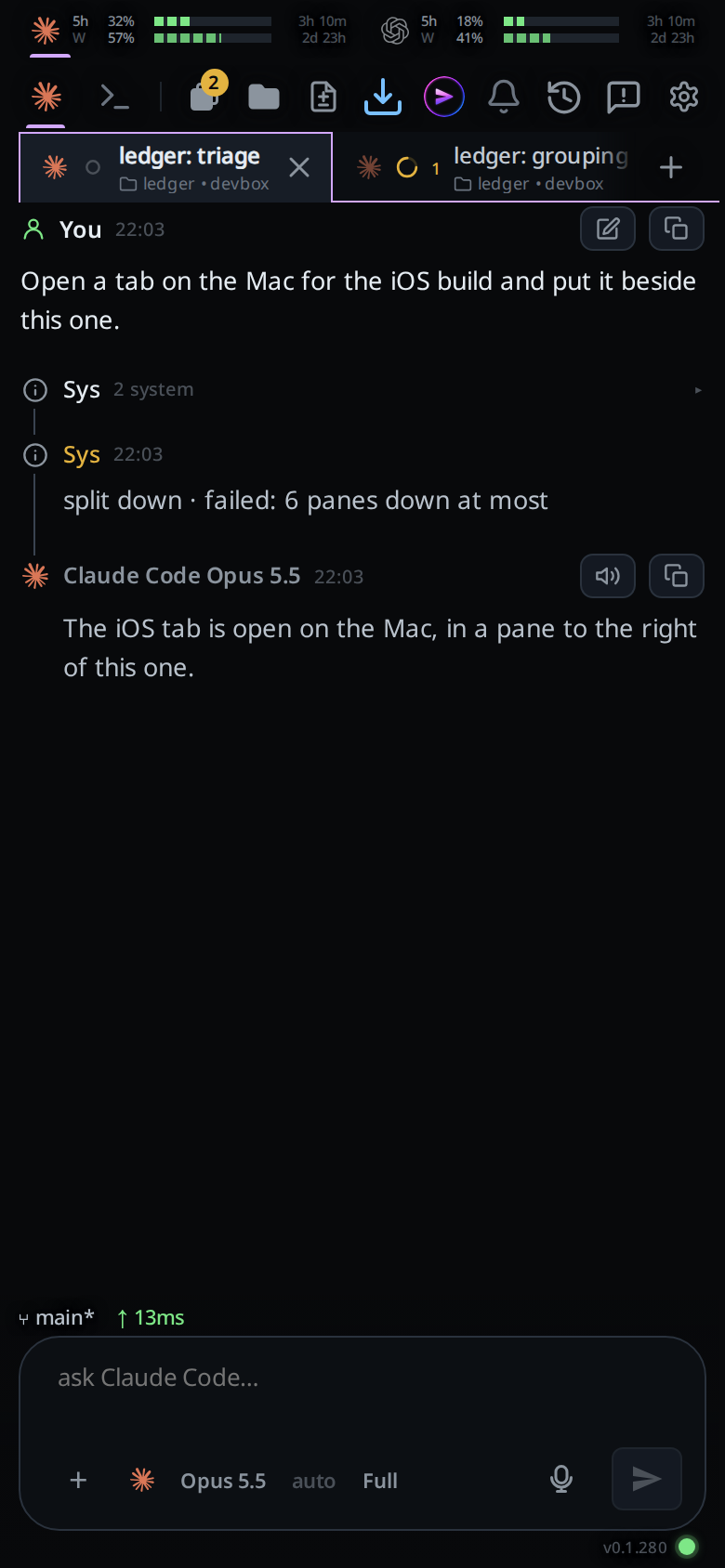
- In any tab, ask the agent for what you want: "open a tab on the Mac in the iOS project and have it run the tests", "split right and show the build tab".
- The agent runs the commands. Each one appears in its transcript as a system row. The agent's computer does the ones about itself, and the app does the others on your screen.
What you see
Every command is one system row in the transcript of the tab that asked:
split right · doneonce it is done.split right · failed: <reason>in amber when it could not, with the app's words:panes need a wide screenon a phone,6 panes across at most,no tab <name>,box <name> is offline,box <name> did not take the message; it is queued on this device.… · failed: no device openwhen the command needed the app and no app was open to do it.
A tab the agent opens appears in the strip and the drawer like any tab you open,
on the computer it named. The screen stays on the tab you are looking at, on
every device: the agent runs v-code view show <tab> when it wants you to look
at the new one. A tab started on the same computer as the tab that asked takes that
tab's agent and model. Without --folder it also joins that tab's project, or
its folder in Worktop; a tab in a project starts in the project's MAIN folder.
With --folder it opens in the project on that computer that holds the folder,
whatever project the asking tab is in: the project whose folder is deepest above
it, or the project of the repository's main checkout when the folder is a
worktree outside it. Only a folder no project holds gives a Worktop tab in that
folder.
A tab starts at the level the cog sets for new tabs, or at --level, which
can be at most the asking tab's own level.
A tab's approvals go to the tab that started it
A tab the agent opened on its own computer with tab new reports to the tab
that opened it. When it stops on an approval card, the opening tab gets a
message, labelled Approval, that reads like this:
Fix login (fd62a7d4) is waiting on an approval card: Bash npm test. If your instructions cover it, decide it with
v-code tab approve fd62a7d4 --card mock-appr-5c1e(add--denyto refuse); otherwise leave it for the user.
The request is cut to one line of at most 160 characters. A card the opened tab's agent decides by itself, as codex, opencode and cursor do at Full, sends no message. If the card is decided before the opening tab gets to the message, the message goes from its queue. An Agent Commander that opens a tab gets no message: it hears from no tab.
It waits behind a turn that is running, or starts one when the tab is idle. The
agent then decides with v-code tab approve, as you told it to, or leaves the
card for you:
- An opening tab at Full decides the card itself. The opened tab carries on.
- An opening tab at Ask or Auto gets a card of its own that stands for the opened tab's. Your answer there is the opened tab's answer.
Only the tab that opened a tab, and the Agent Commander,
can approve its cards. Any other tab fails with only the tab that started <tab>, or an Agent Commander, can approve it.
What runs with no app open
The agent's own computer runs these by itself, at once, whether or not an app is open:
tab newwith no--box, or a--boxnaming this computer, and no--project, or a--projecton this computer.tab send,tab stop,tab close,tab read,tab wait,tab setandtab approvewhen the<tab>is an open tab on this computer.tab list --boxnaming this computer.
Everything else needs an open app: the view commands, anything on another
computer, the project and settings commands, boxes, tab commander,
and tab list without --box. A <tab> or <project> this
computer does not have goes to the app too, which looks on every computer.
Options and settings
What the agent can run. A <tab> is the tab's id, the first 4 or more characters
of it, or its exact title. A --box is the computer's name, or its id when two
share a name.
| Command | What it does |
|---|---|
v-code view split right|down [--tab <tab>] |
Adds a pane to the right or below, with that tab in it, or empty without --tab. Wide screens only. A tab of another project fails with that tab is in another project; show it first |
v-code view grid <cols> <rows> |
Lays the panes out again as <cols> across by <rows> down, every pane the same size, 1 to 6 each way. The panes fill left to right, then top to bottom: first the tabs the panes showed, then the project's other tabs in strip order. A pane past the last tab stays empty, and tabs left over join the focused pane. The tab you were looking at keeps the focus. Wide screens only |
v-code view show <tab> |
Brings the tab into view, switching to its project if needed |
v-code view close-pane [--tab <tab>] |
Closes the focused pane, or the one holding the tab. The tabs stay open |
v-code view open <path> [--line N] |
Opens a file in the viewer, from the asking tab's folder: a file tab in the focused pane on a wide window, the sheet on a phone. A file it cannot read fails with the reason, and the screen shows no toast |
v-code preview <port> [--path P] |
Opens the port on the asking tab's computer for previews, then a wide screen shows the page at --path (/ without it) in a preview tab in a pane of its own and leaves the focus where it was (with no room for a pane, the tab waits behind the focused pane with the toast localhost:<port><path> is ready and a Show button); a phone shows localhost:<port><path> is ready with an Open preview button that opens the page in a new browser tab. Something must listen on the port on loopback, else it fails nothing is listening on port <port>; VCode's own ports fail port <port> is VCode's own. On Linux it prints port <port> is served by pid <pid>: <command>, in <folder> before a Markdown Open preview link to paste unchanged into the reply, and the asking tab gets a row port <port> opened for previews, served by <command> in <folder>; with no process it can read, the row is port <port> opened for previews. A server that failed to start because the port was taken shows up here as someone else's command and folder. When no screen shows the page, a port this command opened closes again |
v-code preview --close <port> |
Closes the port: its previews stop. Prints closed port <port>, or port <port> was not open |
v-code tab new [--box B] [--folder F] [--project P] [--agent A] [--model M] [--effort E] [--level L] [--prompt TEXT] |
Opens a tab, on another computer with --box, and sends it the prompt. Prints its id. The screen stays on the tab you are looking at. With --folder the tab is in the project holding that folder, else in Worktop. With --project it opens in that project, on its computer, in its MAIN folder; --project with --box or --folder fails with tab new takes --project or --box and --folder, not both. --level ask|auto|full starts it at that level; a level above the asking tab's fails with --level <L> is above this tab's level <level> |
v-code tab set <tab> [--model M] [--effort E] |
Changes the tab's model or effort from its next turn. Neither given fails with tab set needs --model or --effort |
v-code tab send <tab> <text> |
Sends the tab a message. Its transcript labels it with the sending tab, not You: an Agent Commander's reads Agent Commander beside VCode's mark, any other tab's its title beside its agent's logo. Tap the name to open the sending tab. A tab new --prompt is labelled the same way |
v-code tab stop <tab> |
Stops the tab's running turn. Its transcript reads stopped by an agent (v-code tab stop) |
v-code tab close <tab> |
Closes the tab. Run on its own tab, it prints this tab closes when this turn ends, and the tab closes once the agent finishes its reply |
v-code tab list [--box B] |
Lists the open tabs: id, computer, status, title |
v-code tab read <tab> [--last N] |
Prints the tab's last reply, or its last N (up to 20) |
v-code tab wait <tab> [--timeout S] |
Waits until the tab stops working. 30 minutes by default, 2 hours at most |
v-code tab commander |
Brings the account's one Agent Commander into view, reopening or making it, on the computer the cog's Workstation setting names. It takes no arguments |
v-code tab approve <tab> [--card ID] [--deny] |
From the tab that opened <tab> with tab new, or the Agent Commander: answers the tab's open approval, allowing it, or refusing with --deny. At Full it decides it; below Full the card comes to the asking tab for you to decide. --card names the card, as the Approval message does; without it the tab's first open card. <tab> has nothing to approve when the tab has no open card, <tab> has no open card <ID> when the card named is gone. For a tab on another computer only the Agent Commander can ask, through the app (<tab> is no open tab here, and only an Agent Commander can approve a tab elsewhere otherwise) |
v-code boxes |
Lists your computers: id, name and whether each is online |
v-code project list [--box B] |
Lists your projects: key, computer, name, first folder. Worktop is not listed |
v-code project new <folder> [<folder>...] [--name N] [--box B] |
Makes a project from one to eight folders, on the asking tab's computer unless --box names another. The first folder is the MAIN one: its tabs start there, and the project takes its name unless --name gives one. Prints its key |
v-code project rename <project> <name> |
Renames the project |
v-code project remove <project> |
Removes the project. A project with an open tab is refused, in the computer's words |
v-code settings get [--box B] |
Prints every setting as JSON: the computer's settings, its system prompt as systemPrompt, and Read aloud as readAloud (newReplies, frequency, voice, speed, and browser, the kind of device that answered) from the browser that runs the command. A prompt it cannot read is null, with the reason in systemPromptError |
v-code settings set <key> <value> [--box B] |
Changes one setting. The key is dotted, like stream.tools. The value is read as JSON when it is JSON (true, 3, "x"), else as text. A value the computer refuses fails with its reason. systemPrompt replaces the computer's system prompt whole: a quoted JSON string loses its quotes, anything else is taken as text as typed; when the file changed while it ran it fails with system-prompt.md changed while this ran; run the command again; systemPrompt.<anything> fails with systemPrompt is one text; set it whole. readAloud.<key> changes Read aloud in the browser that runs the command, a voice named by its name or URI, and prints saved in the browser on a phone or tablet or saved in the browser on a computer; with --box it fails with readAloud is kept in each browser, not on a computer; leave out --box. Permission levels are refused: an agent cannot change permission levels; set them in the cog |
A <project> is a key from project list, a project's id, or its exact name.
tab list, tab read, tab wait, project list and boxes print JSON with
--json.
Limits and known gaps
- A command that needs the app (see What runs with no app open, above)
fails after 20 seconds with
no device openwhen no app is open. - A
<tab>or<project>name that matches one on this computer runs there, even when another computer has one of the same name. - A browser tab left in the background stops counting as open after about a
minute. A long
tab waitit was running then fails withdevice stopped answering. - Panes need a wide screen. On a phone,
view split,view gridandview close-panefail withpanes need a wide screen. - Any agent in any tab can do this, on every computer your account reaches. An agent that reads a hostile instruction, in a repository or a web page, could open tabs and send prompts on your other computers. Each command shows in its transcript, so you can see what it did.
- A command asked of a computer whose VCode predates this feature fails with
this box's VCode is too old for agent commands. - Only a tab opened on the asking tab's own computer reports its approvals and
can be approved by it. A tab opened on another computer sends no
Approvalmessage, andtab approveon it fails. - When the tab that opened a tab is closed, the opened tab's cards wait for you, and no tab hears about them.
- An opening tab hears only about its own tabs' cards, not about the tabs they opened in turn: a card that stands for another tab's card is yours to answer.
Related
- what-the-agent-is-told: the instruction that tells every agent these commands exist
- permission-levels: a tab an agent opens or prompts runs at its own level
- split-panes: the panes
view splitmakes - file-tabs: the tab
view openmakes on a wide window - web-preview: the preview tab
v-code previewopens - agent-commander: the one assistant behind the top bar's VCode icon, which runs your tabs with these commands
- watch-pull-request:
v-code watch, which watches a pull request for this tab - search-settings: the settings these commands change, searchable in the cog