
Files as tabs in panes
On a wide window a file or image you open is a tab in a pane, after that pane's thread tabs. You can read two files side by side next to the agent that is changing them, and drag a file tab between panes like a thread tab.
Why you would use it
The agent is editing a file and you want to watch the file and the thread at the same time, or read the code it is changing beside the test that covers it. A sheet over the thread hides the thread. A tab in its own pane does not.
How to use it
File tabs need a window at least 760px wide, the width panes need. Below that a file opens in the viewer sheet, as on a phone.
Click a file row in the explorer. The file opens as a tab in the focused pane's strip, after its thread tabs, and the pane shows it. The tab carries the file's icon and name, and its full path as a tooltip. Click a file that already has a tab and that tab comes to the front; no second tab is made. A file link in an agent's reply, the file name on a
READorWRITEcard and Edit system prompt open a file tab the same way.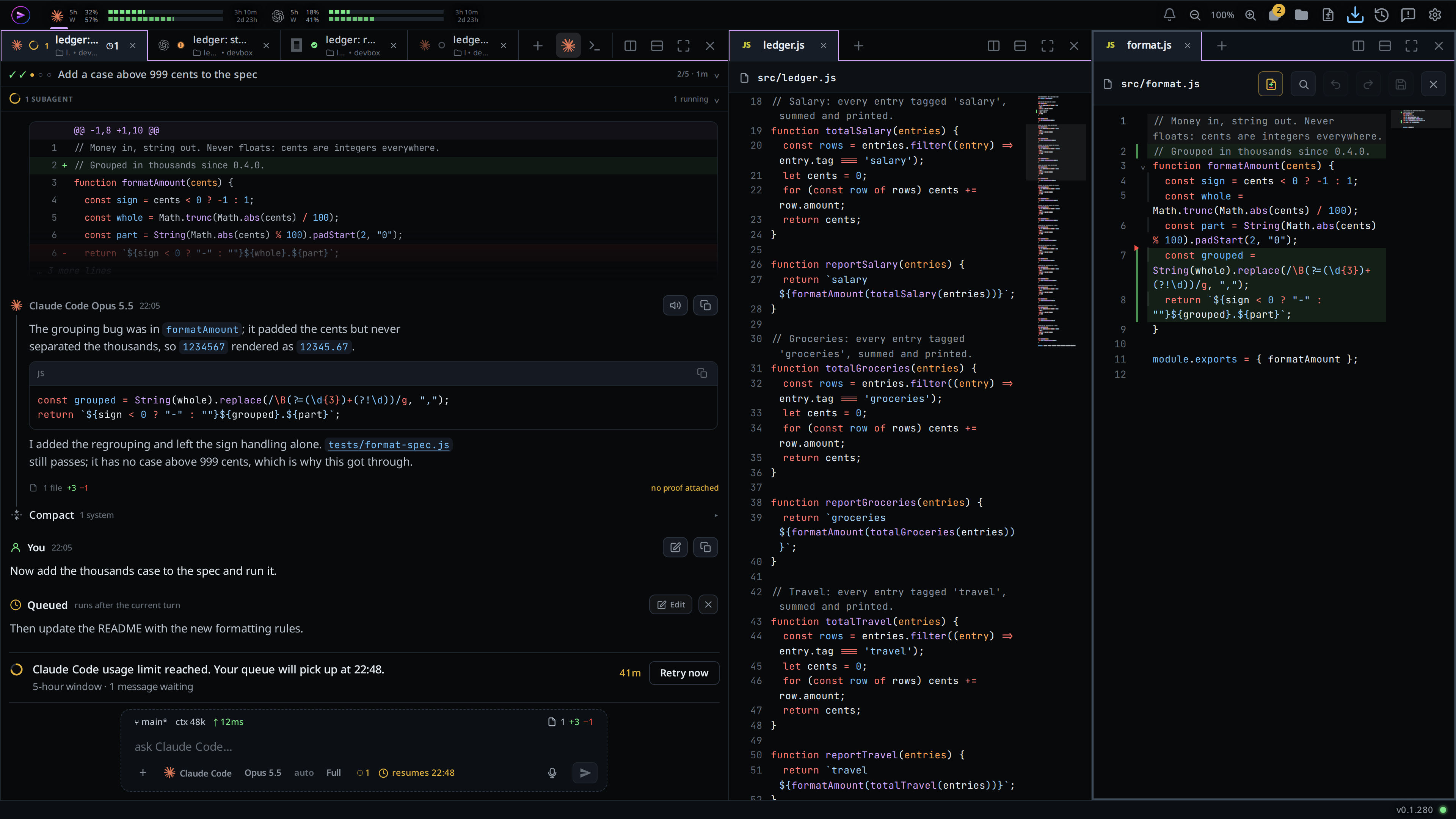
To put a file in the pane to the right, Ctrl+click its row (Cmd+click on a Mac). It goes to the pane to the right of the one it was opened from. With no pane there, the window splits right and the new pane holds the file. When no split fits, it opens in the focused pane. A file already open moves by dragging its tab (next step).
Drag a file tab like a thread tab: along its strip to reorder it, onto another pane's strip or the middle of its body to move it there, or onto a pane's edge to split. File tabs stay after the thread tabs in every strip.
Click a thread tab in the same pane to bring the thread back in front of the file. The file tab stays in the strip.
Click the tab's × (
Close <name>), middle-click the tab, right-click it and choose Close, or press Ctrl+W (⌘W on a Mac) while the pane shows the file, to close it. Ctrl+W works with the caret in the file's editor too. With unsaved edits a card asksSave changes?first: Save saves and closes, Discard drops the edits and closes, Cancel keeps the tab open (see edit-a-file). The viewer's own close button (#viewer-close) closes the tab the same way.The Tabs column and the tab drawer list each open project's file and preview tabs after its thread tabs, with the file's icon, name and folder. The one in front of the focused pane is lit, in place of the thread behind it. Click a row to bring that file to the front of its pane, in its project's window. Its × (
Close <name>) closes the tab as the strip's × does; for a project not on screen it closes the tab without switching to that project. A search in the column leaves file rows out.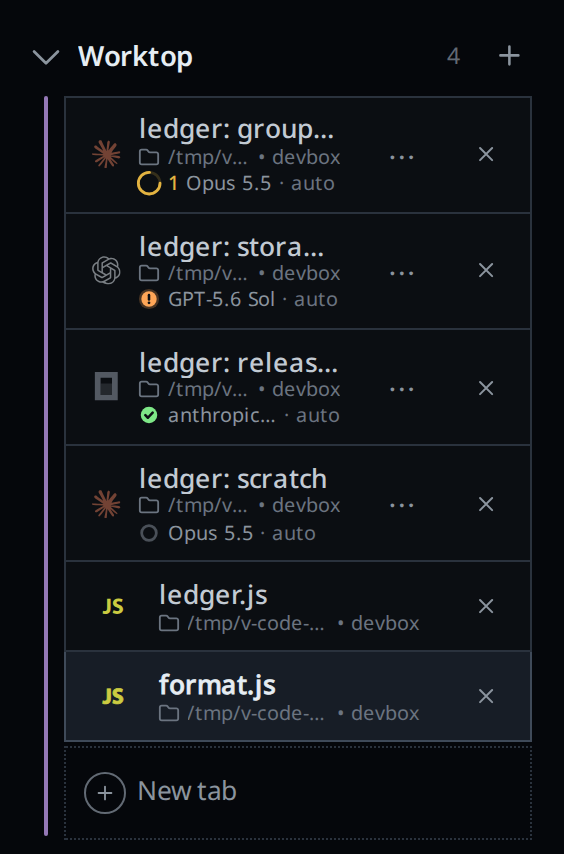
What you see
The focused pane showing a file holds the live viewer: the head with the path, the diff button, save and close, and the file in the editor, where you edit and comment. See edit-a-file.
Another pane showing a file holds a read-only copy: a head with the file icon and the path, and the text with its change marks. The copy is read again every three seconds and redraws only when the file changed on disk. Click into that pane and it becomes the live viewer; the pane you left shows a copy.
The live file's tab shows an amber dot in place of its × while it has unsaved edits, the same dot as the viewer's head. Its × reads
Close <name>, unsaved edits, with the tooltipUnsaved edits. Point at the tab and the × comes back.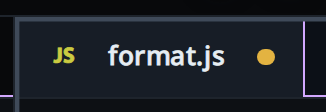
Unsaved edits in a file you leave for another pane are kept as a draft and come back when you focus its pane again.
A pane with a file in front has no composer and no stub under it: there is no thread there to type to. No thread tab in that strip is lit.
On a wide window the text has a minimap beside it, in the live viewer and in each copy.
File tabs are kept on this device with the pane layout, per project. A reload brings back every pane's file tabs and the one each was showing.
A file deleted or renamed from the explorer closes its tabs, in every pane.
A file you open that cannot be read leaves no tab, and the error shows as a toast.
A copy whose file is gone from disk closes its tab, with the same toast. A copy that cannot be read for another reason, such as a box that is offline or removed, stays and its pane reads
<path> could not be read: <reason>. A tab kept from before a reload that cannot be read reads<path> could not be readwhen you focus it. One read before its computer finished connecting reads again when it connects.
Limits and known gaps
- Desktop only. A phone, or a window under 760px, opens every file in the sheet and shows no file tabs. Narrowing the window closes the live file; its tabs come back when you widen it again.
- A file has one tab in a project's layout. You cannot open the same file in two panes.
- Only one file is editable at a time: the one in the focused pane. The others are read-only copies until you focus them.
- A pane that held only a file tab stays, empty, when you drag that tab away, as for thread tabs.
- You cannot drag a file from the explorer onto a pane, or drag a file row in the Tabs column.
- The layout is per browser. Another device has its own file tabs.
- Only the live file's tab shows the unsaved dot. A file you left with unsaved edits keeps them as a draft, but its tab shows no dot until you focus it again.
Related
- file-viewer: the viewer a file tab holds, and the minimap
- split-panes: the panes file tabs live in
- edit-a-file: edit and save in the live file tab
- file-explorer: where file tabs are opened from
- tab-drawer: the Tabs column that lists file tabs under their project
- agent-commands:
v-code view openopens a file tab on a wide window - web-preview: a web page from your computer as a tab beside the file tabs