
Comment on a line of a file
Right click or hold a line in the viewer, type what is wrong with it, and send it to the agent as a message that names the file, the line and quotes it. Select part of a line, or several lines, first and the comment quotes only what you selected.
Why you would use it
The agent wrote something you want changed, and "line 42 of runner.js, the timeout is too short" is easier to point at than to describe. The comment carries the line's text with it, so the agent does not have to guess.
How to use it
Open a file in the viewer.
Right click the line, or hold your finger still on it on a phone. A menu opens: Copy, Select all and Comment. A right click opens it where you clicked; on a phone it opens under the selection, past its handles, or above it when there is no room below.
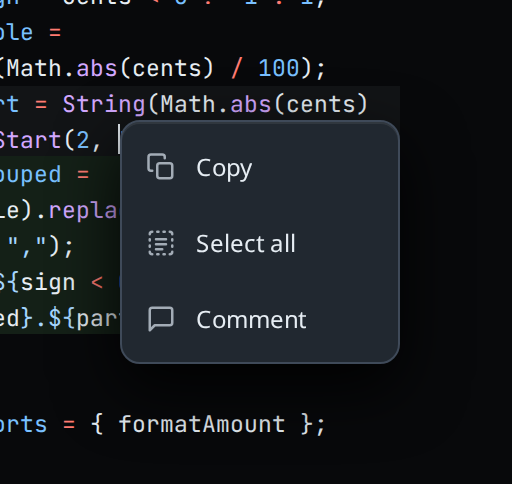
Tap Comment. A box opens under the line: an avatar beside a text field with the placeholder
comment on line <n>…. The avatar is the first letter of your VCode account's email, orYwhen the workstation is not linked to an account.Type the comment.
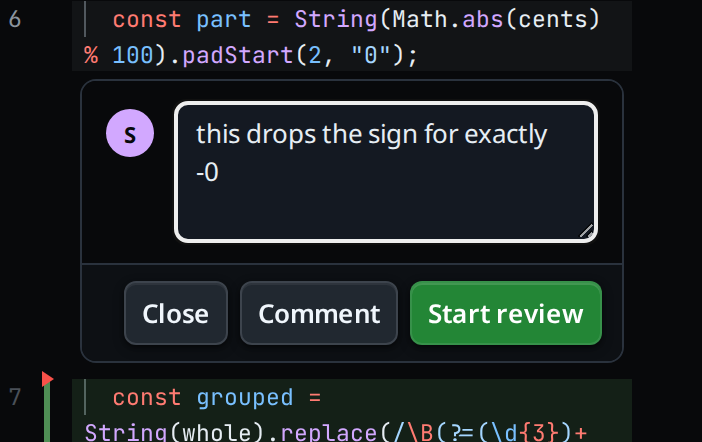
To comment on part of a line, or on several lines, select the text in the editor first, then right click or hold inside the selection and tap Comment. The box opens under the selection's last line. Its placeholder reads
comment on lines <first>–<last>…when the selection covers more than one line.Tap Comment to send it to the agent on its own, or Add to review / Start review to gather it with others (see review-a-file).
Tap Close to drop the box without sending. On a line that already has a comment the button reads Remove; tapping it takes the comment away. Back, or Escape on a keyboard, closes the box the same way and leaves the file open.
What you see
- One box at a time, under the line it is about. In the editor the box and the comments already written sit between the lines and move with them as you type; tap a comment to open its box.
- A comment on a selection shows the selected text in its card, not the whole
line, and its badge reads
lines <first>–<last>for more than one line. - In the menu, Copy copies the selection when you clicked inside it, and
the whole line when nothing is selected there; a toast reads
selection copiedorline copied. Select all selects the whole file. Escape or a click elsewhere closes the menu. - On a phone, drag a selection handle to select more lines. The menu goes away while you drag and comes back under the new selection once you let go; Copy and Comment then act on everything selected. Scroll the file and the menu moves with the selection the same way.
- A plain click or tap in the editor only places the cursor. A right click in the box or on a comment keeps the browser's own menu, for paste.
- Comment and the review button are disabled while the box is empty.
- A sent comment shows a toast:
comment on line <n> sent. - Offline, the message goes to the
outbox and the toast
reads
offline: comment queued in outbox. - If the send is refused for want of a
login but kept in the
outbox, the toast reads
sign in; the comment is queued. - If the send fails outright, the words are not lost: they are kept as a review
comment and the toast reads
<error>; kept as a review comment.
The message the agent receives:
Comment on lib/runner.js:42
> const TIMEOUT = 10_000;
this is too short for a cold start
A comment on a selection quotes only the selection, one > line per line of it,
and names every line it covers:
Comment on lib/runner.js:42-43
> const TIMEOUT = 10_000;
> const RETRIES = 1;
these two go together
Limits and known gaps
- One comment per line. Writing on a line that already has one rewords it; saving it empty removes it. A comment on a selection belongs to the selection's last line.
- Only the editor comments on a selection. In the read view and the diff sheet a comment is on the whole line.
- A right click or hold outside the selection is about the line under it, as if nothing were selected: Comment comments on that line and Copy copies it. A selection of exactly one whole line is a comment on that line.
- In the read view (an image or a file that cannot be edited, a read-only copy in another pane, or a file whose editor did not load) a tap on a line opens the box, as it does in the diff sheet.
- The quote is the line as the editor has it, unsaved edits included.
- The quoted line is trimmed and cut at 200 characters, with
…on the end. A quoted selection loses the indent all its lines share and is cut at 2000 characters. - A removed line has no line of its own to comment on: it is not a line of the file as it is now.
- In the read view, tapping a link, an open box or an existing card does not open a new box, and neither does dragging out a text selection.
- The comment is sent with mode
queue: it runs after the turn in progress. It does not carry the attachments waiting in the composer. - A single comment sent from a line that was part of a gathered review is taken out of that review.
Related
- review-a-file: gather several comments and send them at once
- edit-a-file: change the line yourself instead of asking
- file-viewer: the sheet the lines live in, and its read view
- viewer-diff-marks: why a removed line cannot be commented on
- queue-or-steer: what mode
queuemeans for the turn - queue-a-message-offline: where an offline comment waits
- diff-review-sheet: the same comment box on a line of a diff
- cite-and-comment: comment on words selected in the transcript, the same way