
Send a photo, a video or a file with your message
The + under the composer attaches a screenshot or a video. Hold it and you get the
whole file browser instead. On a desktop you can also paste an image straight
into the box, or drag a file from another window and drop it on the composer.
Why you would use it
The fastest way to show an agent a broken screen is the screenshot you just took.
On a phone that is two taps: +, then the newest photo.
How to use it
Tap
+(#attach), at the left end of the row under the box. Android Chrome opens its photo picker with the newest screenshot first, because the input (#photo-input) accepts images and videos only.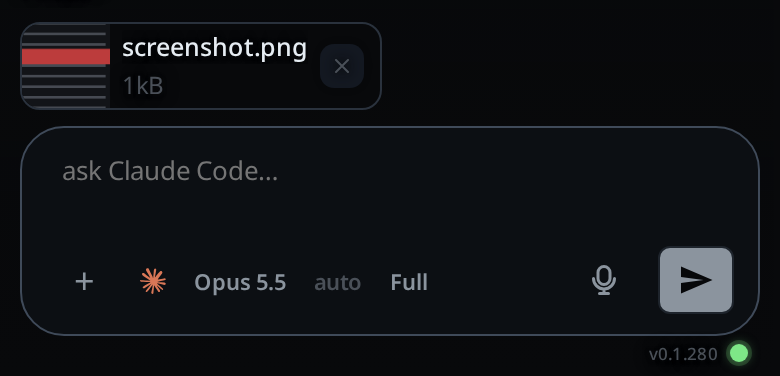
To attach anything else, hold
+: a long press on a phone, a right click on a desktop. That opens the file browser (#file-input), which also takesvideo/*,text/*,application/pdfandapplication/json.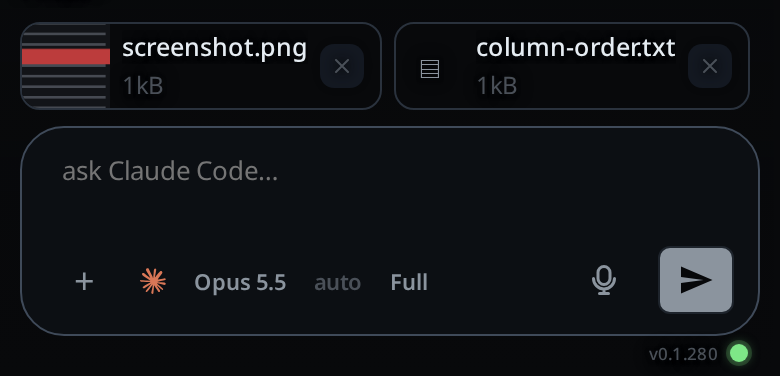
On a desktop, paste an image into the box (
#draft) instead.Type your message, or do not. An attachment on its own is a complete message.
Send.
What you see
- Each staged file appears as a chip above the box, in the strip
#drafts. Images show a thumbnail; everything else shows its name and size. - A photo is shrunk on the phone before it is staged: the longest side goes to
1568 pixels, the size the models read an image at, and a JPEG, WebP, HEIC,
HEIF or AVIF is saved as a JPEG. A PNG stays a PNG, so a screenshot keeps its
text sharp. The chip shows the shrunk size, and that is what uploads. A
HEIC becomes
IMG_0001.jpg. A GIF, an SVG or any other file goes up as it is. - A video over 8 MB, or with a side over 1280 pixels, is compressed on the phone
before it is staged: an MP4 at most 1280 pixels on its longest side, about
2.5 Mbit/s. A minute of 4K that would be some 350 MB comes out near 20 MB.
IMG_0001.MOVbecomesIMG_0001.mp4. While it runs, the toast readsCompressing IMG_0001.MOV… 40%. The chip appears when it is done. - A longer video gets a lower bitrate, so the MP4 stays under about 90 MB. A video too long for that, past about 20 minutes, goes up as it is.
- A browser that cannot compress video sends the original. So does a video the compression would not make smaller.
- Each chip has an × to remove it, labelled
Remove <name>. - Online, the file uploads as soon as you pick it, so the send itself is fast.
- Offline, the bytes stay on the phone and you get the toast
<name> queued on this device. The message goes to the outbox with the file, and both go up when the connection comes back. - A queued message's card in the transcript shows its attachments too, so you can see what is waiting.
+is disabled with no tab open; attaching without one fails withstart a thread first.
Options and settings
| Option | Default | What it changes |
|---|---|---|
VCODE_MAX_ATTACHMENT_BYTES |
unset | the largest file this workstation takes, in bytes, in place of the 100 MB cap |
#photo-input accept |
image/*,video/* |
what the + tap offers |
#file-input accept |
image/png,image/jpeg,image/gif,image/webp,image/*,video/*,text/*,application/pdf,application/json |
what holding + offers |
Files the models can read as images are image/png, image/jpeg, image/gif
and image/webp. Anything else is classified as a file and passed to the agent
by path. A video is a file: the agent gets its path and reads it with its own
tools, for example ffmpeg to pull frames.
Limits and known gaps
- One file is at most 100 MB on most accounts. The workstation can set its own
cap with
VCODE_MAX_ATTACHMENT_BYTES. A file over the cap is refused before it uploads: the chip goes away with the toast<name> is over 100 MB, naming the workstation's cap. An empty file is refused too. A file picked offline is checked when it uploads: its queued message then stays in the outbox with the same words, for you to edit or drop. - A big upload waits as long as a 256 KB/s link would need for it, and never less than two minutes. Slower than that, it times out and is queued on the phone.
- No model takes a video directly. The agent sees only its path.
- Compressing takes time. A 20-second 4K clip took about 16 seconds in Chrome on a desktop; a phone can take longer. Keep the app open until the chip appears.
- The shrunk copy is what the workstation keeps; the full-size original stays on the phone only. A browser that cannot decode the picked type (HEIC in Chrome on a desktop, for example) sends the original unchanged.
- Attachments are staged per tab. A send takes the attachments of the tab it was sent from and no others.
- Editing a queued message loses its attachments; re-attach before sending again.
- Picking the same file twice in a row works. The input is reset before the files are read, because otherwise no change event fires and the button looks broken.
- An image type outside the four the models take (for example
image/bmp) is still accepted; it is classified as a file rather than an image.
Related
- mention-a-file: point the agent at a file on the box by its path
- send-a-message: the send path
- drafts-kept-per-tab: why the chips follow the tab
- manage-queued-messages: what happens to files on a queued message
- open-an-attachment: opening a file the transcript carries
- inline-screenshots: an image an agent puts in the transcript
- queue-a-message-offline: where the bytes wait when the send is offline
- cite-and-comment: text cited from the transcript waits as pills inside the box