
Mobile agentic IDE: what it is and what it needs
A mobile agentic IDE is an agentic IDE designed for a phone. You start coding agents in a project, read what they do, review their changes and approve or correct them from the phone, while the agents and the code run on a computer. Fezu is one: it runs Claude Code, Codex and seven other agents on your own computer, and you drive them from your phone at app.fezu.dev.
New to the term? What is an agentic IDE? has the definition. This page is about the phone.
Why a phone changes the design
At a desk you have a keyboard, a wide screen and an hour. On a phone you have a thumb, a narrow screen and a few minutes at a time.
That fits how agents work. An agent takes minutes on a task, and you are not needed for most of them. You give the goal, put the phone away, and come back to read the result and decide what happens next.
A desktop IDE shrunk to a phone screen gets this wrong: it gives most of the screen to typing code. On a phone four other things matter more: saying what you want in few taps, knowing which session needs you, reviewing a change on a narrow screen, and being told when to look.
What a mobile agentic IDE needs
Use this list to judge any tool. Each item says why it matters on a phone and how Fezu does it.
1. Start a session in any folder
If you can only continue what you started at your desk, the phone is a second screen. You need to begin new work from it.
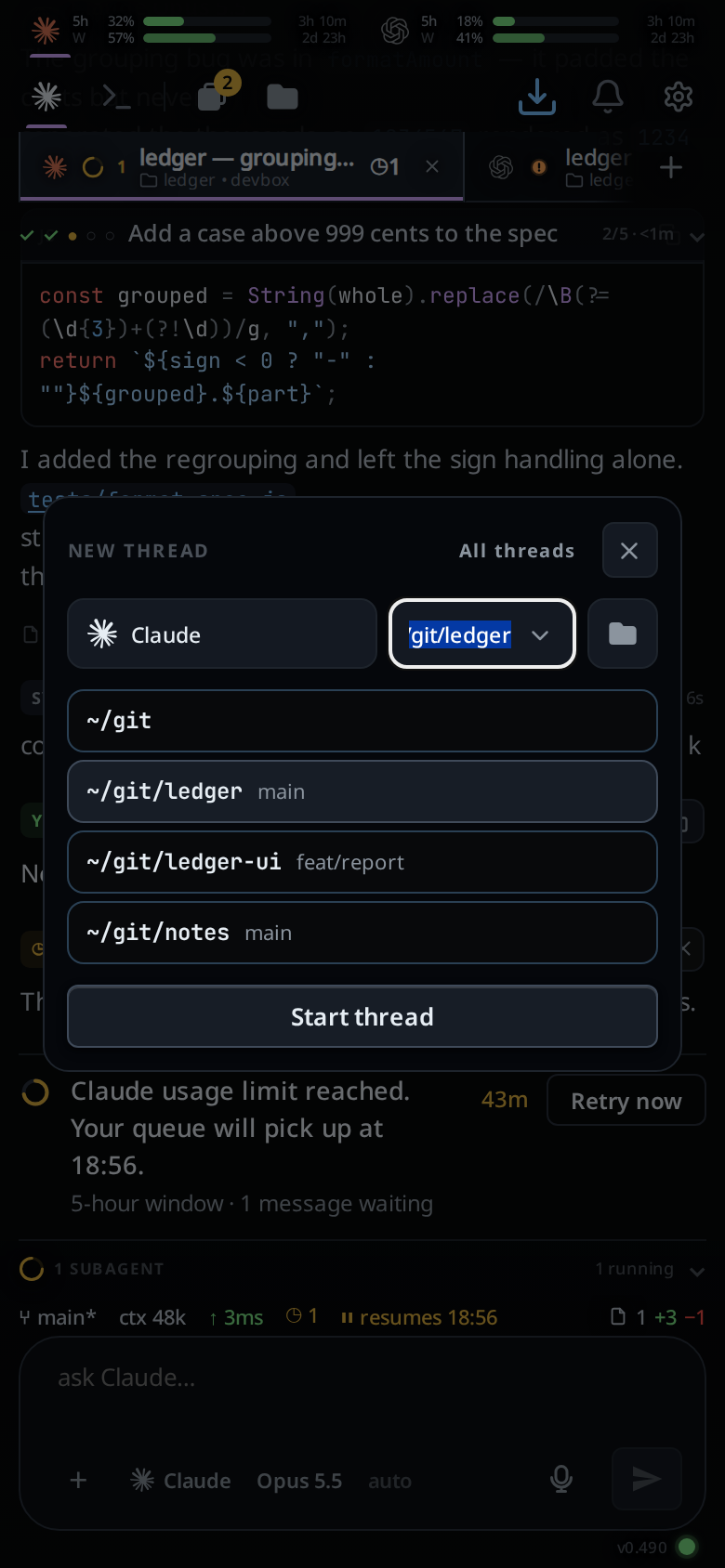
In Fezu you start a tab from the new-thread card: pick the agent, pick the folder, tap Start thread. The folder box lists your repositories as you type and completes any path on the computer.
2. Many sessions, and a fast way between them
One agent at a time leaves you waiting. With three running, you need to see at once which one wants you.
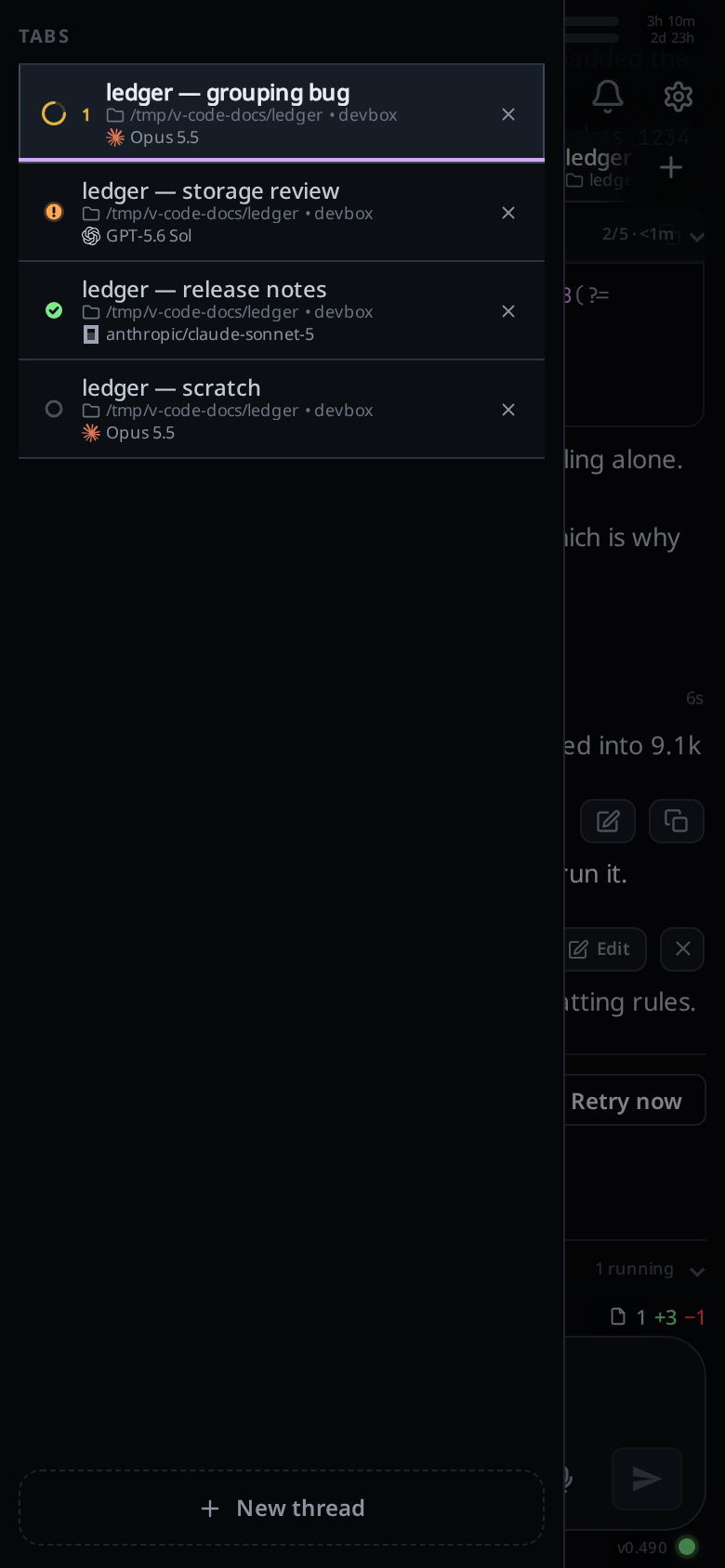
Each Fezu tab is a session. A tab whose agent stopped for you gets an orange !, and one that finished gets a green tick; see tab status. You swipe the transcript sideways to move to the next tab.
3. A transcript that fits a narrow screen
A long task prints pages of command output. On a phone the reply you came for sits under all of it.
Fezu lets you choose how much of each step shows. Group the tool calls and each run of them becomes one row. Tap the row to see the steps, and tap a step to see its output.
4. Review of the changes
The review is the part of the work that stays yours, so it has to work on a phone.
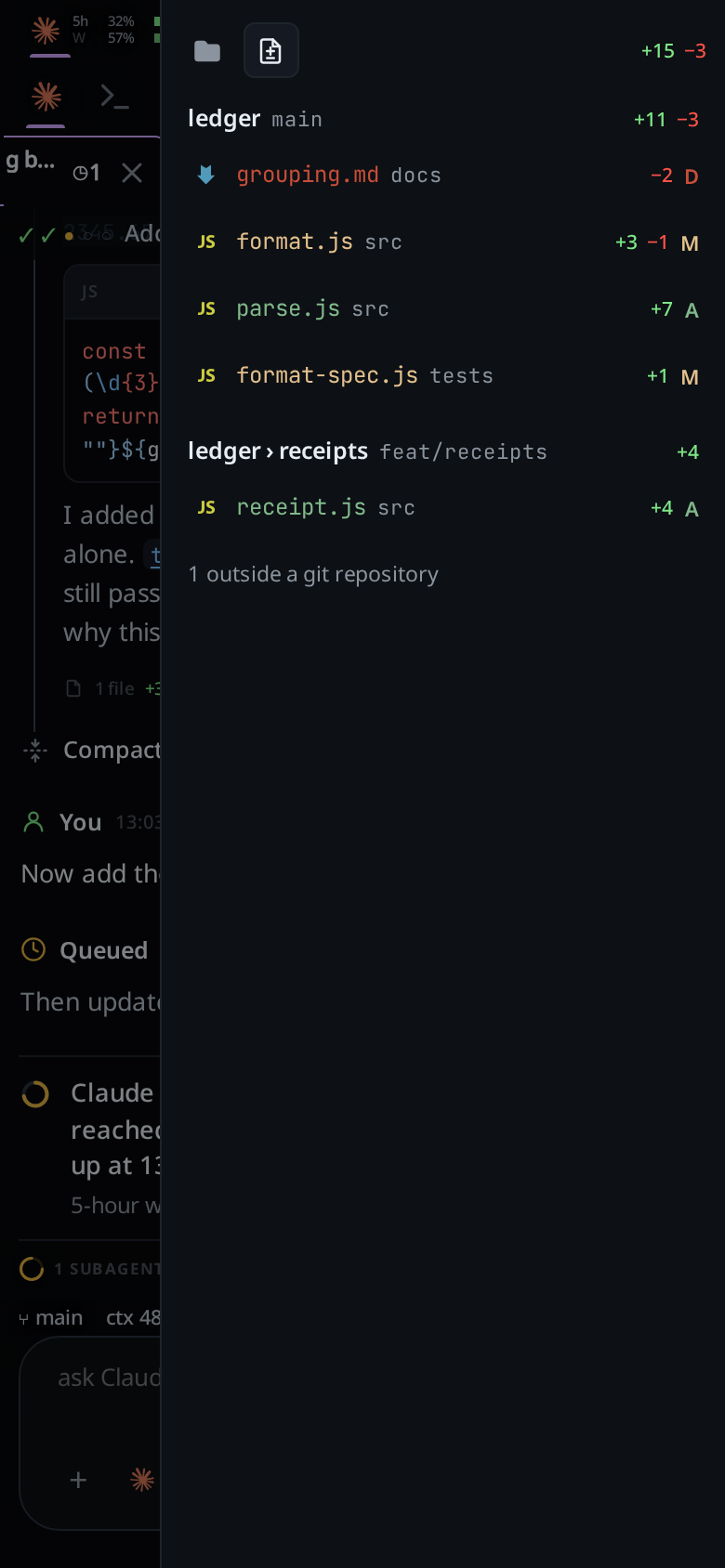
The explorer's Changes tab lists every file the tab changed. Tap one and the diff sheet opens, and you scroll the change like a pull request. Hold a finger on a line of a file to comment on it; the comment goes to the agent. For a one-word fix, edit the file yourself.
5. Approvals you answer from the phone
An agent that waits for a yes at your desk waits until you are back. An agent that never asks may run a command you would have refused.
Each Fezu tab runs at a permission level: Ask, Auto or Full. The menu lists the levels the tab's agent has. When the agent asks, a card headed Needs you shows what it wants to run, with Allow, Allow for session and Deny.
6. A notification when a tab finishes or needs you
Without one you open the app every few minutes to see whether the agent is done.
Tap the bell to turn notifications on. A finished tab sends its name and done. A tab that stopped on an approval or a question sends its name and needs you. Tap the notification and that tab opens. On an iPhone, add the app to the home screen first; An agentic IDE on iPhone and Android has the steps.

7. Voice
A good request to an agent is a paragraph. A paragraph is slow to thumb in.
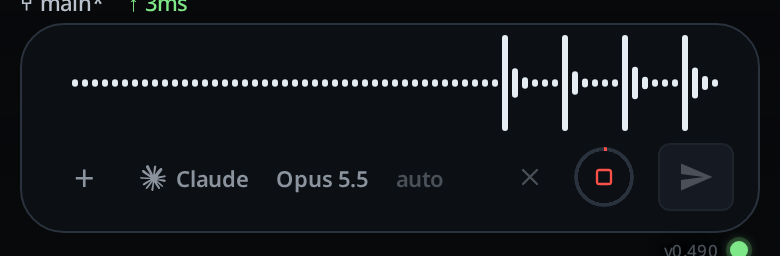
Tap the mic and talk, and the words land in the message box for you to read before you send. Dictation in Fezu is optional. It needs the transcription service installed on a Linux computer, where your voice is turned into text, and it hears English only.
8. Messages that wait
You think of the next step while the agent is busy, or in a tunnel with no signal. The message should not be lost in either case.
While a turn runs, the paper plane queues your message behind it and the steering wheel sends it into the running turn; see queue or steer. With no connection, the message goes to an outbox with the note offline: queued in outbox and is sent when the computer is reachable.
9. A shell
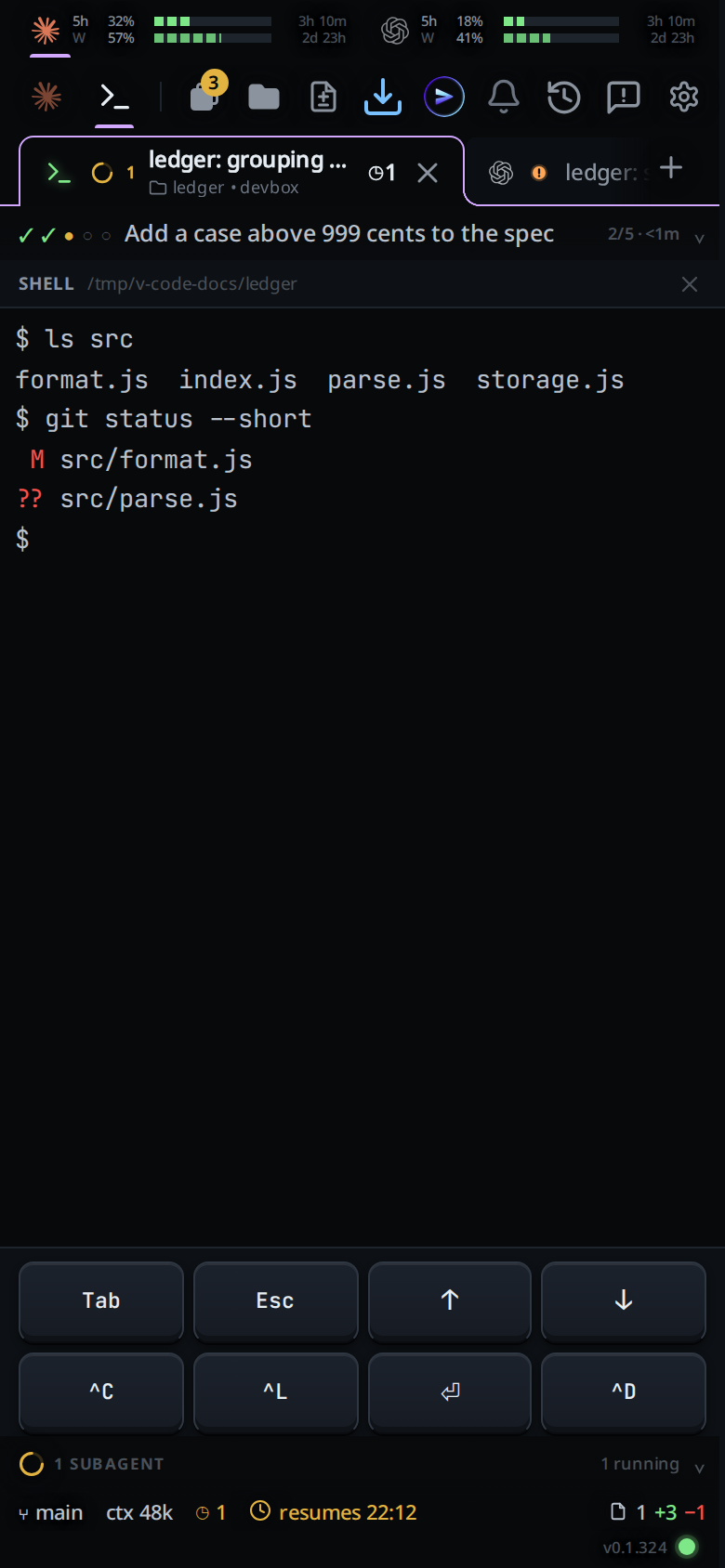
Sometimes you want to run git status or start a dev server yourself, without asking an agent to do it.
Shell mode swaps the transcript for a terminal in the tab's folder, with a row of keys a phone keyboard lacks.
10. More than one agent
Each agent has its own strengths and its own usage limit. On a phone you do not want one app per vendor.
Fezu runs Claude Code, Codex, Cursor, OpenCode, Copilot, Devin, Junie, Antigravity and Muse in the same row of tabs. Usage meters at the top show how much of your Claude, Codex and Muse plans is left. You can hand a tab to another agent, and the new agent gets a written summary of the work so far. A mobile IDE for Claude Code, Codex and OpenCode covers each agent.
11. One agent to run the others
With several tabs open, finding the right one and typing a prompt is itself work.
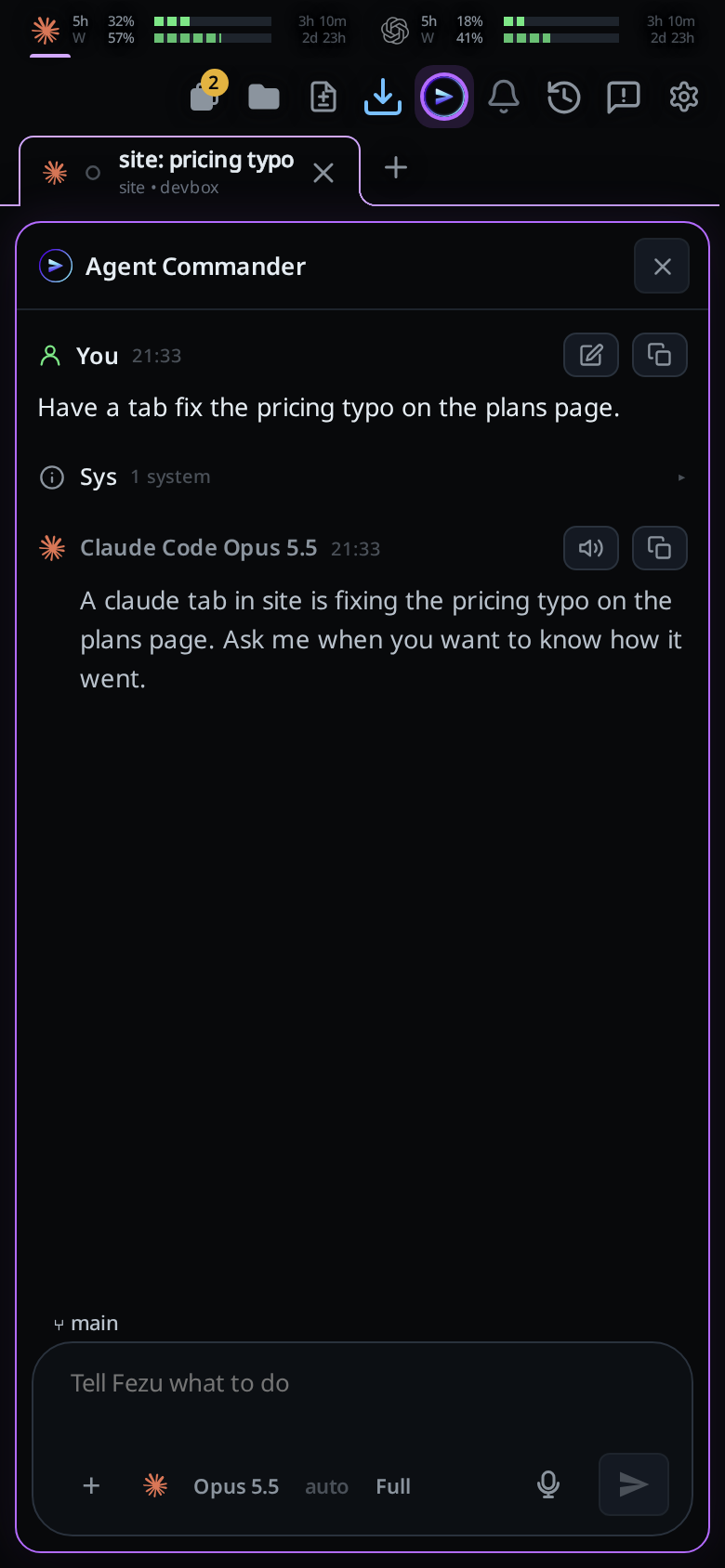
Fezu's Agent Commander takes a request in a box that reads Tell Fezu what to do. It starts tabs for the work, sends them messages, waits for them and reports back.
A vendor's phone app vs a mobile agentic IDE
Most agents now have a phone app from their own vendor: Anthropic's Remote Control in the Claude app for Claude Code, Codex in the ChatGPT app, OpenCode's mobile app, and Cursor for iOS. If you use one agent and its app does what you need, that app is enough.
| A vendor's phone app | A mobile agentic IDE | |
|---|---|---|
| Agents | That vendor's own | Every agent on your computer, in one row of tabs |
| Next to the conversation | Differs from vendor to vendor | The diffs, a file tree, an editor and a shell |
A mobile IDE for Claude Code, Codex and OpenCode says what each vendor's app covers and leaves out. Claude Code Remote Control vs Fezu compares Remote Control row by row.
Where the agent runs
A mobile agentic IDE does not run the agent on the phone. The agent runs in one of two places.
- Your own computer. Your code, your tools and your agent logins stay where they are. The computer has to be on and awake.
- A cloud workspace. Nothing of yours has to stay on. The project and its tools have to be set up in the vendor's environment first.
Fezu is the first kind. The agents run on your Linux PC, Windows PC or Mac, and the transcript stays on that computer. Keep awake stops the computer from sleeping while its agents work.
Try it
The Fezu homepage has a demo under Try it in your browser. It runs in the page, with nothing to install. Mobile IDE: four ways to code from your phone covers the other ways to code on a phone, if an agent is not what you want.
To set Fezu up, you need a Linux PC, a Windows PC or a Mac with at least one agent on it.
- Open a terminal on that computer (PowerShell on Windows, Terminal on a Mac) and run the install command. On Linux or a Mac:
On Windows:curl -fsSL https://fezu.dev/install | shirm https://fezu.dev/install.ps1 | iex - When it finishes, Fezu opens. Log in or create an account with your email; we send a code to it.
- On your phone, open app.fezu.dev and log in with the same email. Your workstation is already there.
FAQ
What is a mobile agentic IDE?
A mobile agentic IDE is an agentic IDE designed for a phone. You start coding agents, read their steps, review their changes and approve their commands from the phone, while the agents and the code run on a computer.
Can I run coding agents from my phone?
Yes. You send the request from the phone and the agent runs on your computer. With Fezu you start a tab on Claude Code, Codex or another agent in any folder, then read and review its work on the phone.
Does the agent run on the phone?
No. The agent, your code and your tools stay on your computer. The phone shows the transcript, the diffs, the files and a shell from that computer.
Does my computer have to stay on?
Yes. The agents run on it, so it has to be on and awake. Fezu's Keep awake setting stops a workstation from sleeping while its agents work. A closed lid still sleeps.
Is a mobile agentic IDE the same as a remote-control app?
No. A vendor's remote-control app drives that vendor's agent. A mobile agentic IDE runs the agents of several vendors in one row of tabs, with the diffs, a file tree, an editor and a shell next to the conversation.
Which agents does Fezu run?
Claude Code, Codex, Cursor, OpenCode, Copilot, Devin, Junie, Antigravity and Muse. Each one uses the login it already has on your computer.
What does Fezu cost?
Fezu is free. You bring your own agent subscriptions.
- Run the install command in a terminal on your computer.
- Fezu opens. Log in or create an account with your email.
- Open app.fezu.dev on your phone and log in with the same email.
More guides are on the guides page.