
See the proof a turn's work is done
When the agent finishes a change to code, its last reply carries a Proof section: whether its work is merged, the screenshots it took, the checks it ran, and the full git diff of its work, one tap away.
Why you would use it
The agent says it is done. Before you merge or move on you want to see it: what the screen looks like now, which tests ran and what they said, and every line it changed on its branch. The Proof section puts all three under the reply, so you judge the work without asking for it.
How to use it
Ask for a change to code. VCode tells the agent to attach a proof before its final reply (what-the-agent-is-told).
When the turn ends, read the Proof section under the reply: a
PROOFlabel with the merge status beside it, the screenshots, one line per check, and a files line reading<n> files +<added> −<removed>.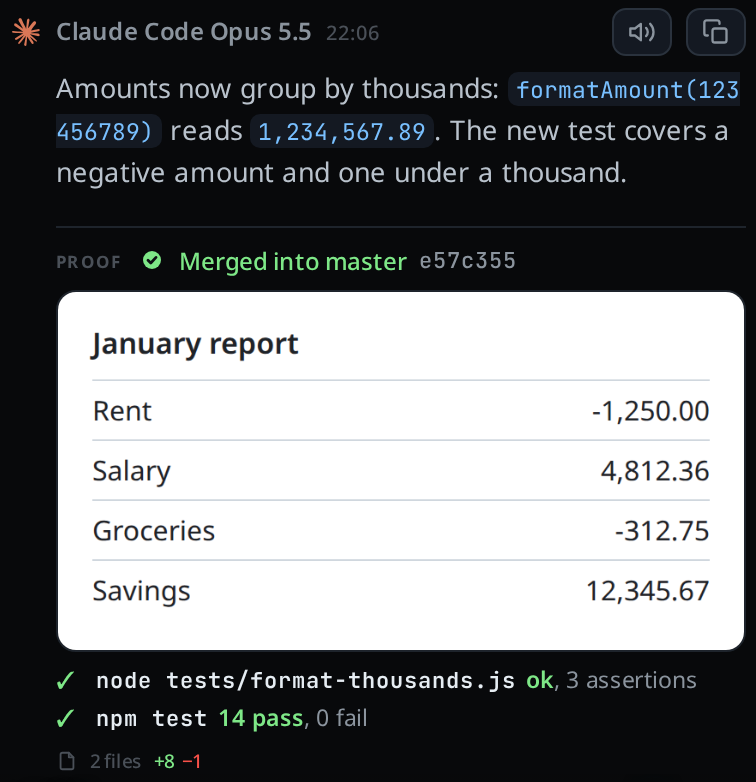
Tap a screenshot to see it full size.
Tap the files line to open the diff sheet on the proof's diff: the list of files on top, then every file's hunks.
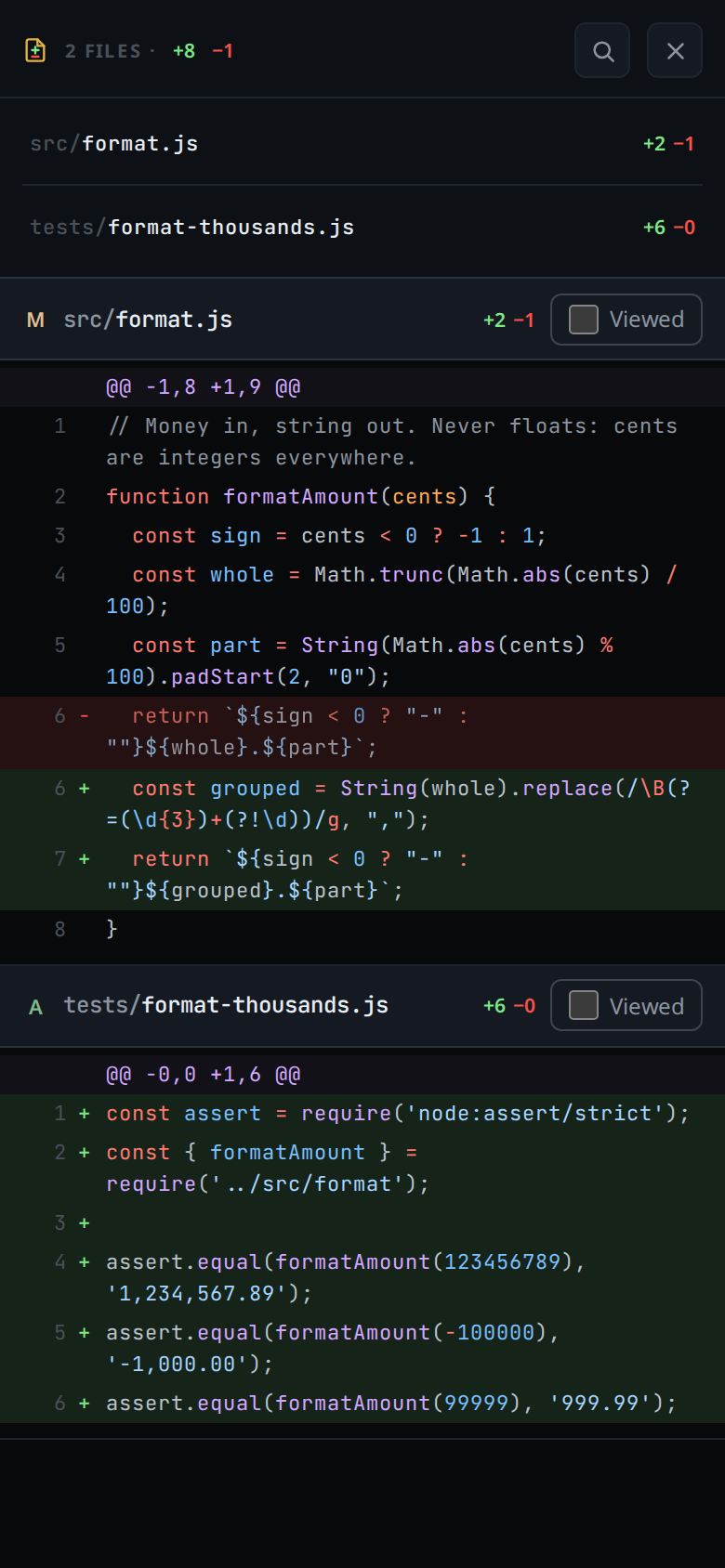
On a wide window the sheet fills the transcript's column.
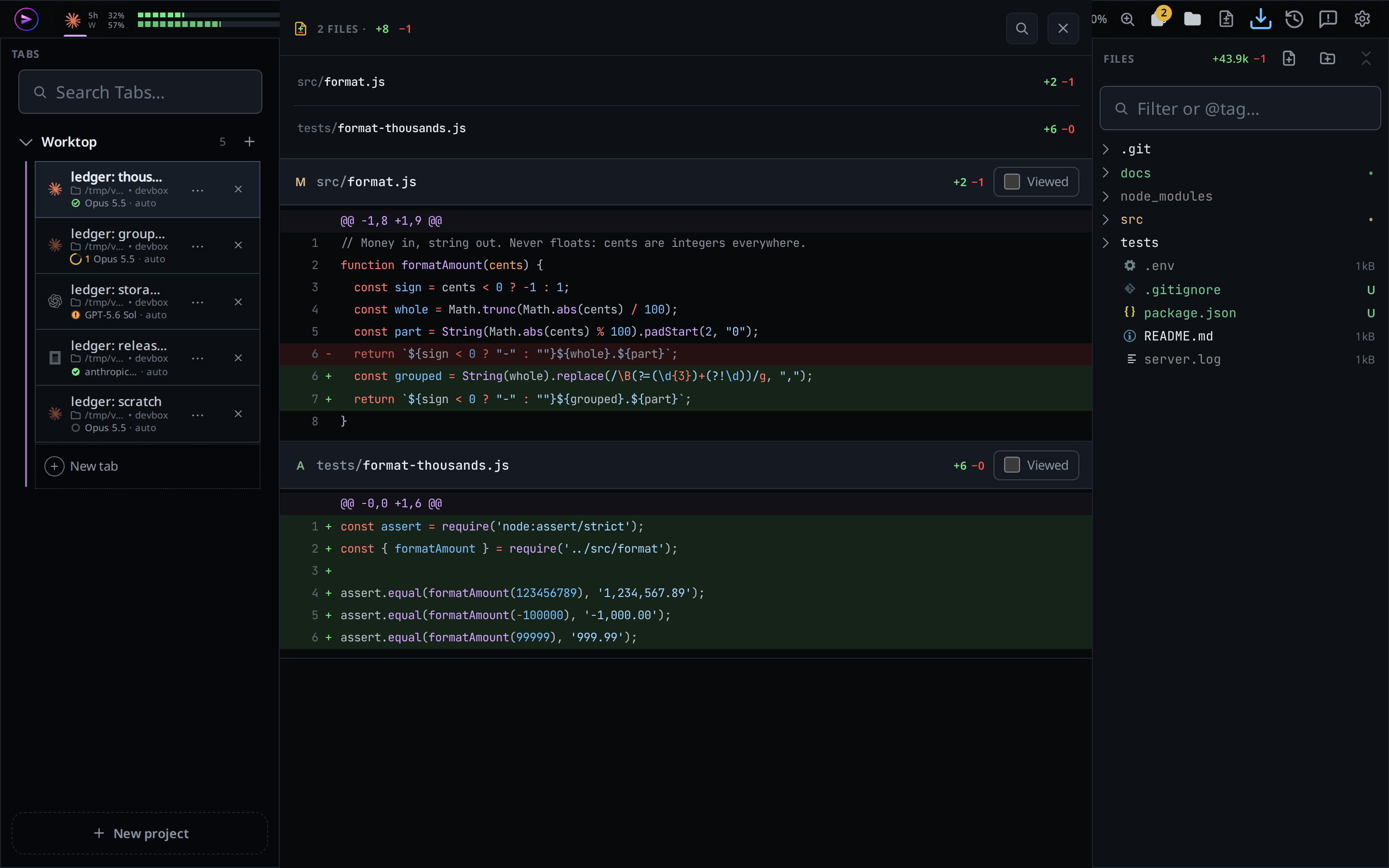
Mark files Viewed or comment on lines there, as on any diff in the sheet.
What you see
- The section sits under the text of the turn's last reply, in place of the
turn's
<n> filefooter (turn-changes). - The status beside
PROOFsays where the work went. VCode asks git when the section first shows, and asks again for unresolved proofs when a turn ends, including in a background tab, when the connection returns, or when you return to the page. Reloading the page also reads fresh status.- Merged into master in green beside a tick, with the commit that brought it in when git can name it. A branch rebased before the merge shows no commit.
- Merged · proof had uncommitted work in orange beside the
!glyph: the branch's commits are on the base, but the proof was taken with changes not yet committed. A later commit may contain only part of those changes, so the warning stays. Take a new proof after committing to establish a clean result. - Not merged in orange beside the
!glyph, with the branch name. - Not merged · branch deleted in red beside a cross: the branch is gone, its commits are not on the base, and the base has not changed any of its files since the branch left it.
- A proof taken with
--baseset to a commit id instead of a branch is checked against the branch the main checkout is on, since the commit itself never moves. - A remote base such as
origin/masteris checked against the main checkout's branch when it tracks that remote, or the sole local tracking branch otherwise. A local merge counts before it is pushed. If no local tracking branch is configured, the same-named main checkout branch can stand in. An explicit different upstream is respected. The captured diff still uses the base you supplied. A merge already on the remote also counts before you pull. Work captured on the tracking branch itself is checked against the remote. - No pill when the repository is gone, when the proof is too old to check, or when VCode cannot tell: a deleted branch whose files the base has changed since, or a proof taken on the base branch itself with uncommitted work.
- Each check line reads
<command>: <result>. The command shows in bold. A red ✗ marks a result with any count of failures, errors or cancelled tests above zero, such as2 failedorerrors 1. A green ✓ marks one whose counts are all zero, such aspass 412, fail 0, or with no count, one that starts withpassorok. A result that starts withfailorerrorgets a ✗, unless a pass comes later in it:failed before the fix, pass 52 aftergets a ✓. A failure count followed bybeforeis the run before the fix and does not count:19 pass, 0 fail (2 failed before the fix)gets a ✓. Neither does a failure word followed bybeforewhen a pass orokcomes after it:FAIL before the fix, ok aftergets a ✓. Anything else gets a grey dot. - The files line counts the git diff: everything on the branch since it left its base, untracked files included, not only the edits the agent reported this turn.
- An uncommitted file that no commit on the branch touched and that was last
written before the tab was made is left out: the tab did not write it. It does
not count as uncommitted work either, so another session's leftover file in a
shared checkout does not turn the merged pill orange. The command prints
left out, uncommitted and older than this tab: <files>. - In a main checkout that has worktrees, an uncommitted file no commit on the
branch touched counts only if the tab's own commands or edits name it. A file
another tab wrote there while this one ran is left out the same way, and the
command prints
left out, uncommitted and not named by this tab: <files>. - A file git sees as binary is left out of the files line and the sheet. A file whose
changes would take the proof past 1 MB keeps its counts and shows
too large to show; smaller files after it still show theirs. - A proof lists 2000 files at most. The files line still counts every file.
- If a turn attaches two proofs, the last one shows.
- If the agent attached the proof after its last reply, the section stands on its
own at the end of the turn, under a
PROOFtag. - A finished turn that changed files and attached no proof reads
no proof attachedat the right of its footer. The running turn does not: it can still attach one. Nor does a turn that stopped for you, whose reply ends on a question, or a turn that changed only documentation (.md,.txtand the like): the agent is asked to prove only work on code.
Limits and known gaps
- The agent attaches the proof; VCode does not make one for it. A turn the agent
ended without running
v-code proofhas none, and its footer says so. - opencode is not given the instruction to attach a proof, so its turns carry none unless you ask for one.
- The proof is a copy kept in the thread. It shows what the branch held when the agent ran the command, and stays after the worktree is merged or removed.
- A screenshot shows only if the file is still in the box's shots folder.
- A merge that squashes several commits into one gets no pill once the branch is deleted, and Not merged while it stays: git cannot match the squashed commit to the proof's commits.
- Run after the merge, the command finds nothing on the branch and refuses with
nothing to prove, so the proof has to be taken from the worktree first.
Related
- diff-review-sheet: the sheet the files line opens
- turn-changes: the footer a turn without a proof shows, and
no proof attached - what-the-agent-is-told: the instruction that asks for the proof
- inline-screenshots: the shots folder the screenshots come from