
Run JetBrains Junie in a tab
A tab can run Junie, JetBrains' coding agent CLI (junie). Fezu drives it
over the CLI's ACP mode, so its answers, edits, plans and approvals show in the
same transcript as the other agents.
Why you would use it
You use Junie with a JetBrains AI subscription, or with your own model key, and want to run it from the phone with the same controls you use on the other agents' tabs. Without either, you can still run Junie's free model in one-shot runs. This page lists what Junie does in a tab and what it does not.
How to use it
- Install the CLI if the workstation does not have it. See install-an-agent.
- Log in. Junie runs on a JetBrains account with a JetBrains AI subscription, or on a model key in the workstation's environment. See Logging in below.
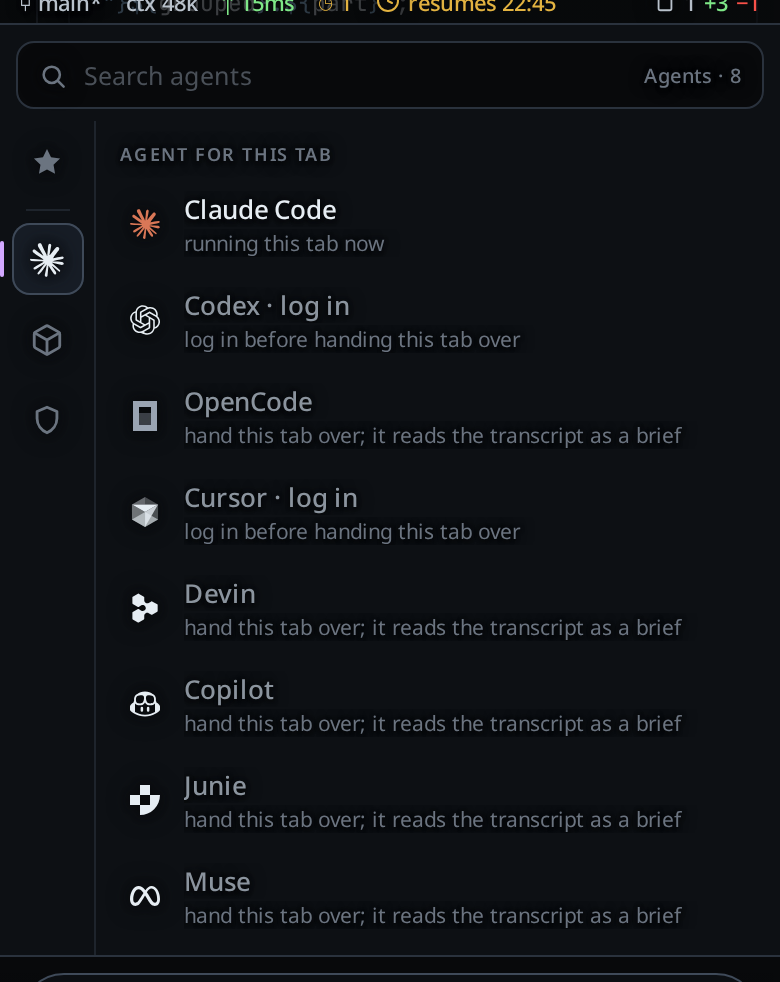
- Pick Junie in a tab's agent menu (
#agentpick, under the message box), then a model in the model menu (#modelpick). - Set the effort on the same menu:
low,medium,highorxhigh, as the model offers them.
Logging in
- A JetBrains account. Tap
Log inon Junie's row in the agents card, or send/loginin a Junie tab. The card shows1. Open the link and approve.and the link. Sign in to your JetBrains account there. The page then ends on alocalhostaddress that does not load on your phone. The card says2. The page ends on a localhost address that does not load. Copy that whole address and paste it here.Paste it into the field (Paste the address from the page that did not load) and tapSubmit. The workstation checks the address and hands it to Junie. Junie gives up on a login after 5 minutes, so finish within that time. - A model key. A
JUNIE_API_KEY(made on junie.jetbrains.com/cli), or a key for one provider, in the workstation's Fezu environment file counts as logged in. The provider keys Junie reads areJUNIE_OPENAI_API_KEY,JUNIE_ANTHROPIC_API_KEY,JUNIE_GOOGLE_API_KEY,JUNIE_GROK_API_KEY,JUNIE_META_API_KEYandJUNIE_OPENROUTER_API_KEY. The agents card names the key it found, never its value.
A JetBrains account without a JetBrains AI subscription logs in, but Junie
then refuses every message in a full session. With How Junie runs on Auto
(the default), Fezu then moves the tab to one-shot runs on Junie's free model;
see One-shot runs. With it on Full session (ACP) the tab
shows:
No active JetBrains AI subscription found. Junie needs a JetBrains AI subscription for this account, or a model key in the box's env (JUNIE_API_KEY or a provider key); see /login.
One-shot runs
A one-shot run sends each message to Junie as a run of its own, and the next message carries on the same Junie session. It is the only way to reach Junie's free model (Junie Lite): JetBrains turns that model off in a full session, so an account with no JetBrains AI subscription can use Junie only this way.
- Open the cog's Agents card and tap Junie's row.
- Pick how Junie runs in
How Junie runs(#agent-run-junie):Auto: a full session while your account can run one. When a message fails because the account has no subscription, the workstation remembers it and new Junie tabs open on one-shot runs. A model key in the workstation's environment keeps Auto on a full session.Full session (ACP): always a full session, with every Junie feature this page lists.One-shot runs: always one-shot runs.
- A tab on one-shot runs shows
Junie's default modelin the model menu (#modelpick), with the effortslow,mediumandhigh. Without a model key that is the free model.
On Auto, a tab at Full whose message fails for lack of a subscription moves
on its own and sends the same message again. The transcript shows:
Junie has no plan on this account: switched to one-shot runs on Junie's free model
A tab in Plan does not switch: its message fails with Junie has no plan on this account, and one-shot runs have no Plan; turn Plan off to run on Junie's free model, and nothing is sent again.
A tab at Ask or Auto stays where it is, and its message fails with:
Junie's free model runs only at Full, with no approvals; set the tab to Full to use it.
The workstation forgets that the account has no subscription when you log in
to Junie again, and when you change How Junie runs. The setting is kept on
each workstation and is not synced to your other workstations.
What a one-shot tab does:
- Full only. Junie asks nothing in a one-shot run, so Full is the only
level. A tab moved to one-shot runs at Ask or Auto keeps its level and shows
Ask is not available on oneshot:default; set the tab to Full to use it(or Auto); its messages fail until you set it to Full. - Steps, not live text. Each step Junie finishes shows as a card when it finishes, and the reply shows when the run ends. Nothing streams in between.
- Edits. The files Junie changed show as diffs when the run ends.
- Stop. Stop ends the run at once.
- Queue. A message you send while a run works waits for the run to end.
- Resume after a restart. The next message carries on the same session.
- Context. Junie keeps the whole session, step output included, and the
context meter shows its size after each run. The free model's window is
262,144 tokens, below the default auto compact mark of 270k, so set a lower
mark with
/autocompactif you want Fezu to compact a long tab. /compact. Fezu ends Junie's session, and your next message starts a new one with the transcript in front of it. See auto-compact.- A new session on a switch. A tab that moves between a full session and one-shot runs starts a new Junie session, so Junie does not see the messages from before the switch.
What works
- Models. The model menu lists Junie's mixes (
Normal,Hard,Frontier), the JetBrains AI models, the models of a provider key with the provider in brackets, such asClaude Haiku 5.5 (OpenRouter), and local Ollama models. - Steering. A message you send while a turn runs joins that turn. See queue-or-steer.
- Stop. Stop ends the running turn. See stop-a-running-turn.
- Resume after a restart. The tab picks its Junie session up again when Fezu restarts. See resume-after-a-restart.
- Adopting a session. A Junie session on the workstation is listed on the resume screen by its title. Adopting it opens a tab with the session's conversation in it. See resume-a-session-from-disk.
/compact. Fezu sends Junie its/compresscommand. Junie answersContext will be compressed before the next taskand compacts at the start of your next message, which shows acontext compactedrow.- Approvals. Below Full, a request from Junie shows as a card with
AllowandDeny. After aDenyJunie carries on without that command and says so. See permission-levels. - Plan. Plan turns on Junie's plan mode. Junie's plan shows as the plan
card; tap
Buildon it to turn Plan off and let Junie build. While it builds, its steps show in the plan strip. - Reasoning. Junie narrates its steps as it works. Those lines show as the tab's thinking rows; its answer shows as the reply.
- Images. Images you attach go to Junie with the message.
- Context meter. The tab's context figure follows the size Junie reports.
The levels
| Fezu | What Junie does |
|---|---|
| Ask | Edits files without asking. Asks before it runs a command. Each request is a card. |
| Auto | Runs the commands Junie judges safe. Asks before the rest. |
| Full | Asks nothing. |
| Plan (flag) | Junie's plan mode, on any level. It reads and plans, and asks before any command. |
| Full, on one-shot runs | Asks nothing. The only level a one-shot run has; there is no Plan. |
What you see
- An effort the model does not offer is refused with
model <model> does not support effort <effort>; supported: <efforts>. - Without a login the agents card shows
not logged inandLog in. - A pasted address that is not the one Junie's login sent you to is refused
with
That is not the address Junie's login sent you to. Copy the whole address from the page that did not load.
Options and settings
| Setting | Default | What it changes |
|---|---|---|
JUNIE_BIN (environment variable on the workstation) |
unset | The path to the junie binary. It wins over every other place Fezu looks. |
JUNIE_HOME (environment variable on the workstation) |
~/.junie |
Where Junie keeps its sessions and logs. Fezu reads both there. |
Update every hour, agentUpdate.junie |
off | Runs Junie's installer once an hour when no Junie tab works. See update-agents-automatically. |
How Junie runs, agentRun.junie |
Auto |
A full session, one-shot runs on Junie's free model, or Auto, which picks. Kept on each workstation. See One-shot runs. |
Limits and known gaps
- A subscription or a key is required. See Logging in.
- A model or effort change restarts the process on the same session.
- Building a plan writes a file into your project. Junie keeps the plan it
builds in
.junie/plans/<name>.mdin the tab's folder. - A message sent just as a command starts can leave one extra card for that command marked interrupted: Junie drops the call and runs it again.
- No fork, no side questions, no
/mcp, no rewind. These are not offered on a Junie tab yet. - No usage meter. Junie reports no account quota here, so the usage meters have no Junie row. The context meter still works.
- Junie cannot ask you a question. It asks in its reply instead.
- One-shot runs have no approvals, no Plan, no steering, no
attachments, no fork, no side questions and no live model switch. A
message with an attachment fails with
Attachments are not available in one-shot runs.Plan is refused withPlan is not available in one-shot runs. - One-shot runs do not stream. A step shows only once Junie finishes it, and the reply only at the end of the run.
- After a Stop, the next one-shot message may finish the stopped task first. Junie picks the stopped task up again and reports on it, and the new message may go unanswered. Send it again.
- A one-shot run that ends without a reply fails the turn with the last
message or error line Junie printed, or
junie exited code=<code> signal=<signal> without a result. - Adoption imports the last 400 items of the session at most. The agent still has the whole session.
- Binary lookup. On Linux and macOS Fezu uses
JUNIE_BINif it is set, thenjunieonPATH, then~/.local/bin/junie. If none exists the tab fails withjunie is not installed (looked on PATH and in <folder>). On Windows it usesJUNIE_BIN, thenjunieonPath, and fails withjunie is not installed (looked on Path).
Related
- the-three-agents: the agents and what each one can do
- copilot: GitHub Copilot, the other agent on the same ACP core
- permission-levels: the levels and Plan
- switch-the-model: the model and effort menu
- resume-a-session-from-disk: finding and adopting sessions
- install-an-agent: installing the CLI from the phone
- log-in-to-an-agent: logging in from the phone