
One set of settings for all your workstations
Workstations linked to one VCode account share their settings and your system prompt. Change one on any workstation and the others take it within seconds.
Why you would use it
You work on two or three workstations through app.fezu.dev. Without this you would set the auto compact limit, the transcript detail and the system prompt on each one, and they would drift apart.
How to use it
- Link each workstation to the same account (link-this-box or add-a-workstation).
- Change a setting in the cog (
#settings-open), or save the system prompt from Edit system prompt (#system-prompt-open). - The account's other workstations that are online take the change. A workstation that is off takes it when it next connects.
The System prompt group in settings says whether this workstation syncs.
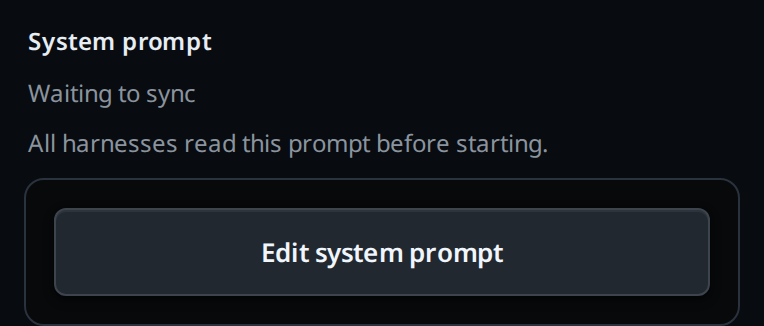
What you see
The first line under the System prompt title (#system-prompt-hint) is the
sync state of the workstation whose settings are open:
| Line | Meaning |
|---|---|
Synced to every workstation on your account |
The account's copy matches this workstation's. |
Only on this workstation |
Not linked, or removed from the account. |
Waiting to sync |
A change is not on the account yet, or this workstation has not fetched the account's copy since it linked. |
Too long to sync: keep it under 32,000 characters |
The prompt is over 32,000 characters, or prompt and settings together are too big to send. Nothing is sent until it is shorter. |
Not synced: <reason> |
The site refused the last change, or sent a copy this workstation does not accept. The reason is the site's error code. |
| (no line) | The site has no settings sync. This workstation stays on its own settings until VCode restarts. |
The line is read when settings open, and so are the values in the cog. A change from another workstation that lands while settings are open shows the next time you open them.
Options and settings
What syncs and what does not:
| Setting | Syncs |
|---|---|
| Auto compact: Enabled, Context tokens limit, Custom prompt | Yes |
| Tabs: Colour new tabs, Colour the composer, Ask before closing a tab, Move finished tabs to Done | Yes |
| Transcript: Thinking, Tool calls, Edits, System notes | Yes |
| Voice: Stop after silence, Send after dictating | Yes |
| Keyboard shortcuts | Yes |
| System prompt | Yes |
| The default folder (Set as default in the new-thread card) | No, it stays on each workstation |
| Keep awake | No, each workstation keeps its own mode |
| Update every hour, per agent | No, each workstation keeps its own switches |
| Agent logins | No, each workstation has its own |
Limits and known gaps
- The first workstation to sync puts its settings on the account. Every workstation that syncs after it takes the account's settings and replaces its own, system prompt included. That covers a change saved on it before it first fetched the account's copy.
- When two workstations save within the same second or so, the later save wins on every workstation.
- A change made while a workstation is offline is kept and sent when it is back, across a restart too. It is not replaced by the account's copy first.
- An edit to the system prompt made outside the viewer, from a terminal or by an agent, applies on that workstation at its next thread. It reaches the account at the next save from the viewer or the settings, or the next time this workstation fetches the account's copy: when it reconnects, restarts or hears of another workstation's change. The local edit wins over that copy and is sent.
- A setting from the account that this workstation's version does not accept is skipped, and the rest apply. The account keeps its value until you change that setting on this workstation. Settings that only a newer VCode knows are kept and passed on unchanged.
- Any workstation on the account can change the system prompt every other one hands its agents, and those agents run without asking for approval. Every linked workstation takes the account's settings; to keep one apart, unlink it.
Related
- system-prompt: the prompt that syncs with the settings
- link-this-box: linking a workstation to the account
- add-a-phone: the devices that open a workstation
- work-on-several-boxes: using the account's workstations from one app
- set-a-default-folder: the one setting that stays per workstation
- auto-compact: settings that sync
- keep-awake: a setting that stays on each workstation
- change-keyboard-shortcuts: keys that sync
- update-agents-automatically: another setting that stays on each workstation