
See which account the app is on, and switch
The app and fezu.dev keep separate logins in your browser. When you open the app from your fezu.dev account page while the app is on another account, it asks which one you want before it opens anything.
Why you would use it
You logged in to fezu.dev with a second email, then tapped Open the app. The app is still on your first account and would open that account's workstations.
How to use it
On fezu.dev/account, tap Open the app.
If the app is on another account, it shows Another account (
#rs-switch) with both emails.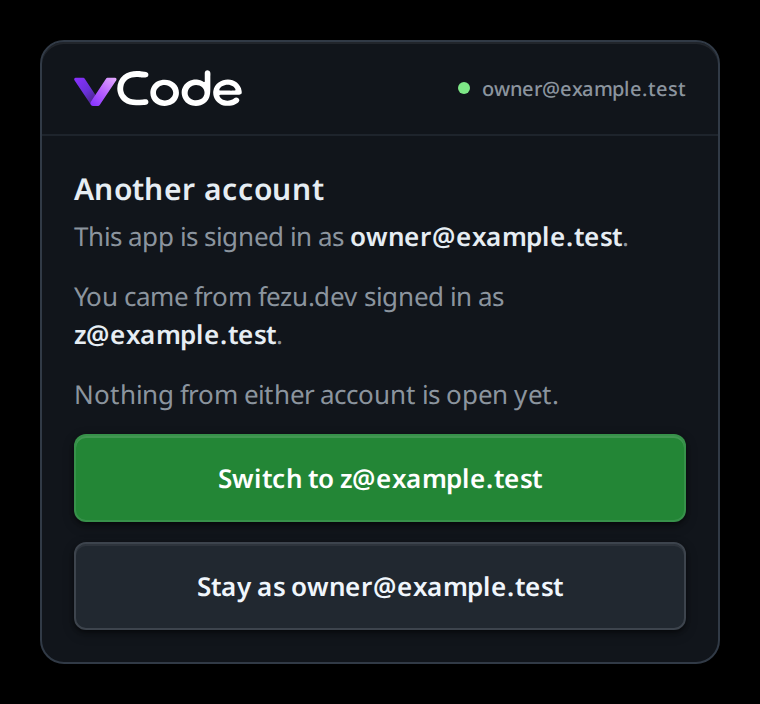
Tap Switch to {email} (
#rs-switch-go) to sign the app out and log it in to the fezu.dev account, or Stay as {email} (#rs-switch-stay) to keep the app's account.To check the account at any time, tap the cog (
#settings-open). The Account group (#settings-account) says Signed in as {email}.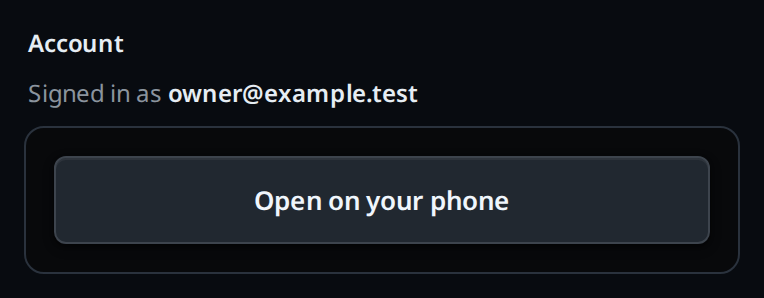
What you see
- Another account: "This app is signed in as {app email}. You came from fezu.dev signed in as {site email}." and "Nothing from either account is open yet."
- Switch leaves for the fezu.dev login, which sends it back logged in to the site's account.
- Stay opens the app's own account. The next link from fezu.dev asks again.
- An app that is logged out asks nothing: it goes to the fezu.dev login, which sends it back logged in to the site's account.
- If the app cannot reach fezu.dev to sign out, the card stays and shows the error under the buttons.
Limits and known gaps
- Only links from fezu.dev/account carry the account. Opening app.fezu.dev directly, or from a bookmark, opens the app's account without asking.
- The Account group shows only in the app, not on a box.
Related
- use-the-app: logging in to the app
- add-a-workstation: adding a workstation on the account page
- trust-model-and-security-headers: what a login on the app can reach