
A tab that hits its memory cap
Each tab has its own memory cap, 8 GB unless the box sets another. VCode warns the tab before it gets there, says so when the agent is killed at the cap, and does not start the agent again while the tab is still full.
Why you would use it
A build or a test run in one tab can fill its cap. At the cap the kernel kills
the largest process in the tab, which is often the agent itself. Files written
to /tmp count too: on most Linux boxes /tmp is in memory, and those files
stay counted after the program that wrote them has exited. Killing a process
frees none of them, so a tab that filled /tmp kills its agent again at every
start until the files are gone.
How to use it
Nothing to turn on. When a tab warns or stops:
- Read the row or the card: it says how much the tab holds, and how much of that is files on tmpfs.
- To free the tab, open another tab and look at what the full one left in
/tmp, for example withdu -xsh /tmp/* 2>/dev/null | sort -h | tail. Delete what is no longer needed. - Tap Retry on the card. The message you sent last is sent again.
What you see
On the way up. Past 80% of the cap, and again past 90%, a system row in the
transcript, such as
Memory at 91% of this tab's 8.0 GB cap: 7.0 GB in files on tmpfs (/tmp, /dev/shm), 0.3 GB in processes. At the cap the kernel kills the largest process in the tab, often the agent.
While a turn runs, the agent is told the same as a Memory row in the
transcript, with the commands to find the large files and the tab's largest
processes. It deletes the files it made and stops the processes it started,
such as dev servers and finished test runs, without asking you. What it did not
make, or cannot judge, it lists for you and asks which to remove. Both warnings
come back only after the tab has dropped under 70%.
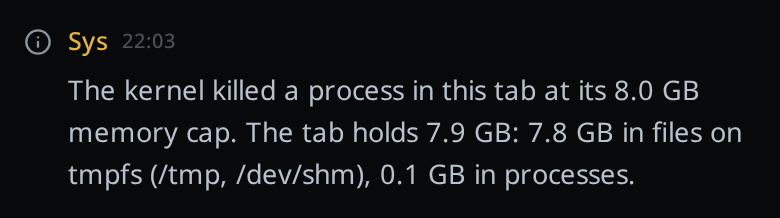
When the kernel kills some other process in the tab at the cap, the row reads
The kernel killed a process in this tab at its 8.0 GB memory cap. The tab holds 7.9 GB: 7.8 GB in files on tmpfs (/tmp, /dev/shm), 0.1 GB in processes.
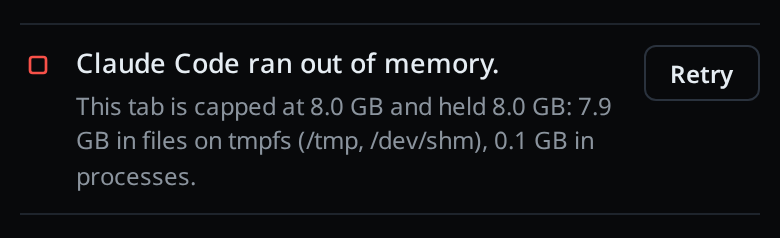
When the agent is killed. The card reads Claude Code ran out of memory. (or the
tab's agent), with
This tab is capped at 8.0 GB and held 8.0 GB: 7.9 GB in files on tmpfs (/tmp, /dev/shm), 0.1 GB in processes.
under it. A message the agent had not started answering goes back to the front
of the queue. VCode does not send it by itself: Retry starts the tab and sends
it. The push and the Agent Commander's feed carry the same words, with the
agent named Claude.
When the tab is still full. If the tab still holds all but the last 1 GB of
its cap when a message would start the agent, the agent is not started. The
message stays queued and the card reads
Claude Code was not started: this tab is still near its memory cap. with
This tab still holds 7.9 of its 8.0 GB, 7.8 GB of it in files on tmpfs (/tmp, /dev/shm). Investigate from another tab, then Retry.
Messages you send meanwhile queue behind it. Retry starts the agent whatever the
tab holds.
The first message the agent gets after either card starts with a note that its previous process was killed out of memory, or that the tab was near its cap, with the same numbers. The transcript shows your message as you typed it.
A TMPDIR on disk. On a box whose /tmp is in memory, each tab's agent and
! commands get their own TMPDIR on disk, and the agent is told:
This tab has a memory cap of 8.0 GB. /tmp is in RAM (tmpfs) and files there count against the cap, so put large build output under $TMPDIR, which is on disk, and delete scratch files when you are done. A podman container started here is not under the cap; pass --memory to podman run.
Tools that honour TMPDIR write there instead of /tmp.
Options and settings
| Option | Default | What it changes |
|---|---|---|
VCODE_TAB_MEMORY_MAX |
8G |
Each tab's cap; see memory-limits-and-parking |
| Warnings | 80% and 90% | Each warns once, and again after the tab drops under 70% |
| Watch interval | 15 seconds | How often each tab with a running agent is checked |
| Start held | within 1 GB of the cap | A smaller cap holds within a quarter of it |
Limits and known gaps
- Only on a box with a cgroup per tab: Linux under systemd with
Delegate=yes. Elsewhere there is no per-tab cap, and none of this shows. - The
TMPDIRand the prompt line come only when/tmpis tmpfs and the tabs have a cap. A tool that writes to/tmpby name ignoresTMPDIR. - Nothing is deleted for you and the cap is never raised. Freeing the tab is up to you, from another tab or a terminal.
- After an out-of-memory kill the agent is not resumed by itself. After any other death of the agent's process, a message it had not started answering is sent again at once.
- A message is sent again only once: if the agent dies on it a second time, it stays in the transcript and nothing is queued.
- A podman container started from a tab runs outside the tab's cap; see
FINDINGS.md. - A tab whose agent is not running is not watched, so a
!command filling the tab between turns shows no warning until the next start is held.
Related
- memory-headroom-and-idle-parking: the box's own cap, refused tabs and parked agents
- memory-limits-and-parking: setting the per-tab cap
- what-the-agent-is-told: the other lines in the agent's prompt