
Background and resumed subagents
An agent can launch helpers that keep working after the call that started them returns, and can pick one back up later. VCode tracks each of them for as long as the process that owns them lives, and closes them as failed, with the reason, when it does not.
Why you would use it
You asked for three independent reviews and want to see all three running, not one row that vanished the moment the launch was acknowledged. And when the agent process dies, you want to be told which helpers died with it rather than watching a row spin forever.
How to use it
From your seat: nothing. The strip fills by itself: above the composer on a phone, under the pane's plan strip on a wide window. From the agent's seat, the VCode prompt asks for subagents when there are three or more genuinely independent tasks, or a workflow that needs independent reviewers.
What you see
One row per subagent, with its name, its task, and a feed of what it is doing.
Claude's subagents report their tool calls as activity lines, for example
Read: lib/runner.js or Bash: npm test. Codex's report their own work:
Running: …, Editing: …, Searching: …, Thinking: …, Reported: ….
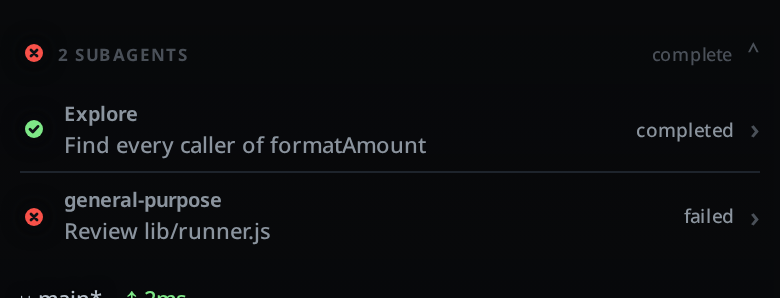
A row that could not finish is marked failed with a reason:
lost when the agent process exited, or
lost when VCode restarted, or
lost when the agent process went away.
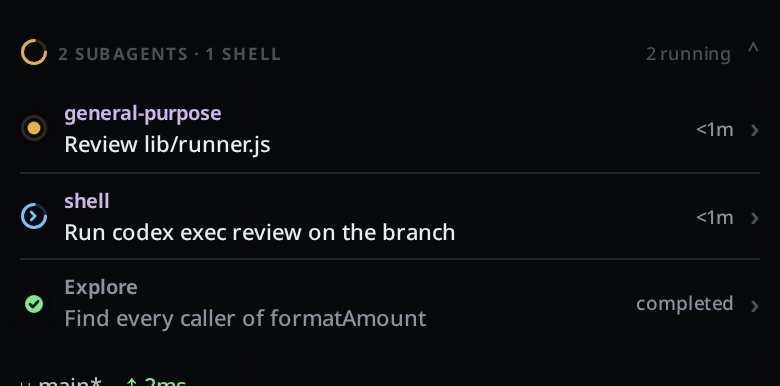
On claude, a command the agent sends to the background gets a row of its own in
the strip, named shell. For example, a codex exec the agent runs with
run_in_background appears there. The row shows the command's description, or
Background command when the agent gave none, and how long it has run. The row
wears the blue background mark, the same one a tab shows while a shell it started
still runs. The collapsed mark is blue when only shells run. The
summary counts shells apart from subagents, for example 2 SUBAGENTS · 1 SHELL.
The row leaves the strip when the command ends.
The strip's rendering is documented with subagents-strip; this page is about which rows exist and when they close.
Limits and known gaps
- A background launch acknowledges immediately with
Async agent launched successfully, while the agent is still working. The row stays running until its task notification arrives, not until the launch returns. - When the notification lands, claude usually reads the result there and then, in
a turn nobody sent. The tab goes back to
workingfor as long as that takes (activity-line). - After a restart, claude can resume a stopped agent with a message to it. The row reopens, but the agent's inner frames still point at the dead process's launch, so progress descriptions are the only activity those rows get, reported once per change, because the CLI repeats them.
- A nested subagent is a line on its parent's row, never a row of its own: its result is not forwarded, so the row would never close.
- A shell row has no feed of output. It shows the command's description and how long it has run.
- Subagent text, thinking and token usage stay out of the thread. Reading a subagent's usage would flip the context figure between the thread's window and the subagent's on every frame.
- A codex subagent reporting back names the root thread; that is ignored, or the tab would become a subagent of itself for as long as it lives.
- opencode has no subagent support: a task-tool subagent there is one tool call in the parent, and its own frames never reach VCode.
- A tab with a running subagent is never parked for memory.
Related
- resume-after-a-restart: what the agent is told about its lost helpers
- activity-line: the turn claude starts when a helper reports back
- what-the-agent-is-told: the instruction that asks for subagents
- memory-headroom-and-idle-parking: why a tab with a live subagent is never parked
- subagents-strip: how the rows are drawn and read
- the-three-agents: which agents have subagents at all
- thread-finished-notification: the phone buzzes
· donewhen the agent's own turn after a helper ends, not before